The formula I used for this is
datediff(cell1,cell2,"m").
This will give you the number of months.
Monday, August 16, 2010


Monday, August 02, 2010
Automatically forward email messages to another user
Today I had a requirement to automatcially forward email messages to another user, since this user has left the organisation.
On my research, I have come up with this article which gives a detailed step by step instructiions
Click here to go to that article
On my research, I have come up with this article which gives a detailed step by step instructiions
Click here to go to that article
Friday, July 30, 2010
MMC cannot open -- in Citrix
Today I had a problem with our citrix server, where in the Management Console was not opening as usual when I try to open any of the below processes. Citrix Access Management console, Event Viewer, Manage Server, Administrative tools etc.
but I could access the event viewer from another machine. Here is what the event viewer error message says.

Here are the steps I have been advised to follow by Aaron Mountford (gen-i consultant) to resolve this.
I have registered the two dlls as follows.
Click Start, click Run, type regsvr32 Msxml3.dll, and then click OK
Click Start, click Run, type regsvr32 %systemroot%\system32\inetsrv\wamreg.dll, and then click OK.
but I could access the event viewer from another machine. Here is what the event viewer error message says.

Here are the steps I have been advised to follow by Aaron Mountford (gen-i consultant) to resolve this.
I have registered the two dlls as follows.
Click Start, click Run, type regsvr32 Msxml3.dll, and then click OK
Click Start, click Run, type regsvr32 %systemroot%\system32\inetsrv\wamreg.dll, and then click OK.
Thursday, July 29, 2010
Convert a date to show AM/PM in SQL
Today I was working on a date column -- create_date. I wanted to show whether the row was created in the morning or in the evening i.e., AM/PM
This is what I did to achieve this.
SELECT rn_create_date, SUBSTRING(CONVERT(varchar(20), Rn_create_date, 22), 18, 3) AS Expr1
FROM tablename;
Here is the link to the BIDN blog where I have posted
This is what I did to achieve this.
SELECT rn_create_date, SUBSTRING(CONVERT(varchar(20), Rn_create_date, 22), 18, 3) AS Expr1
FROM tablename;
Here is the link to the BIDN blog where I have posted
If we are used to the Query Analyser of SQL Server 2000, we might find it frustrating that the query window does not automatically come up when you start SSMS.
You have to either press Ctrl+N or Click on New Query to start it up.
Here is a way to start up the New Query window automatically.
Click on Tools-- Options click on the + to exapnd environment and click on General.
The following screen comes up.
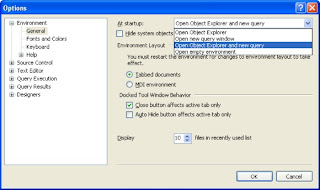
Click on the drop down beside start up and choose ' Open Object Exlpoer and New query'.
Click Ok. Next time when you open SSMS the query window will automatically be opened for you.
Here is link to the blog I posted in my BIDN blog.
You have to either press Ctrl+N or Click on New Query to start it up.
Here is a way to start up the New Query window automatically.
Click on Tools-- Options click on the + to exapnd environment and click on General.
The following screen comes up.

Click on the drop down beside start up and choose ' Open Object Exlpoer and New query'.
Click Ok. Next time when you open SSMS the query window will automatically be opened for you.
Here is link to the blog I posted in my BIDN blog.
Friday, July 23, 2010
Hiding your folders using command prompt
To hide your folders using the command prompt, click start -- run -- Type cmd and press enter
The commoan screen appear.
Do the following:
The commoan screen appear.
Do the following:
- To hide, d:/>attrib +h +s +r
- To revert d:/>attrib -h -s -r
The folder ill be still hidden even if you set 'show all hidden files' under folder view options
Make sure you keep a note of your fodler name otherwise you cannot unhide it.
Thursday, July 22, 2010
Star Schema vs. Snowflake Schema
Star Schema
• Start schema is simpler and hence good to use for small data warehouses. The rules that apply here are as follows:
• Each dimension is represented by a single dimension table
• Each dimensional table is related to or linked to a fact table.
• The relation is merely a master and detail relationship with Primary key being the dimension and reference key in the fact table.
• When there are 5 or more dimensions referring to one fact table it appears like a star and hence the name star schema
• In terms of ease of use you need less complex queries and easy to understand
• This design has redundant data and hence hard to maintain and change.
• Lesser query execution time due to lesser number of queries
Snowflake Schema
• Snowflake schema starts like a star schema and more complex and hence it is good to use the snow flake schema for large data warehouses. The rules that apply here are as follows:
• Each dimension is represented by a two or more dimension tables
• Each dimensional table is not directly related to fact table
• Here the tables that describe the dimensions are normalised.
• In terms of ease of use you have to use more complex queries
• There is no redundancy and easy to maintain and change
• More query execution time because of more foreign keys
• Start schema is simpler and hence good to use for small data warehouses. The rules that apply here are as follows:
• Each dimension is represented by a single dimension table
• Each dimensional table is related to or linked to a fact table.
• The relation is merely a master and detail relationship with Primary key being the dimension and reference key in the fact table.
• When there are 5 or more dimensions referring to one fact table it appears like a star and hence the name star schema
• In terms of ease of use you need less complex queries and easy to understand
• This design has redundant data and hence hard to maintain and change.
• Lesser query execution time due to lesser number of queries
Snowflake Schema
• Snowflake schema starts like a star schema and more complex and hence it is good to use the snow flake schema for large data warehouses. The rules that apply here are as follows:
• Each dimension is represented by a two or more dimension tables
• Each dimensional table is not directly related to fact table
• Here the tables that describe the dimensions are normalised.
• In terms of ease of use you have to use more complex queries
• There is no redundancy and easy to maintain and change
• More query execution time because of more foreign keys
Friday, July 16, 2010
Make movies online
Today I came across this site where you can make movies on the web. Here is the link.
You can start creating movies just by typing your text.
You can start creating movies just by typing your text.
Friday, June 25, 2010
Building a cube without a data source
Sometimes we might have to build a cube without a relational data source. In this scenario, we can build a cube without a datasource focusing on designing the dimensions and measures and then BIDS can generate the relational schema that is needed to populate the cube.
The following are the steps to achieve this.
•Start a new analysis Services Project in BIDS.
•In the Select method to build the cube diablog box -- choose "Build the cube without using a data source".
•In the Define New Measrue dialog box -- define the measures and measure groups.
•In the Define New Dimensions dialog box -- define the dimensions and set the basic properties
•In the Define Time Periods dialog box -- Define the first calendar day, last calendar day, first day of the week and the time periods whether it is year, quarter, month, date etc.
•Specify additional calendars if needed
•In the Define Dimension Usage dialog box -- Specify how the dimensions relate to the measure groups in the cube.
•In the completing the Wizard dialog box -- Enter the cube name and click Generate Schema now tickbox. This generates the schema geneeration wizard.
•In the Schema Generation Wizard dialog box -- Specify the Data Source view name and this will create the new Data Source View.
•In the Connection Manager dialog box -- Fill in the Provider, server name, Logon to the server, Connect to database fields.
•In the Impersonation Information dialog box -- Use the Service account (is recommended)
•In the data source wizard -- Specify the data source name
•In the Subject Area Database Schema Options dialog box -- Specify the options, accept the defaults
•In the Specify Naming Conventions dialog box -- just accept the defaults.
•After the above steps are completed, the data source view is generated in BIDS
•Populate the data source with data so that this data can be used to populate the cube.
•The last step is to right click the relevant cube in the solution explorer and select Process. Accept all the defaults and click Run. This step extracts data from the data source view and populates the cube.
The cube is now ready for viewing.
Here is a link to the original blog I posted on BIDN.
The following are the steps to achieve this.
•Start a new analysis Services Project in BIDS.
•In the Select method to build the cube diablog box -- choose "Build the cube without using a data source".
•In the Define New Measrue dialog box -- define the measures and measure groups.
•In the Define New Dimensions dialog box -- define the dimensions and set the basic properties
•In the Define Time Periods dialog box -- Define the first calendar day, last calendar day, first day of the week and the time periods whether it is year, quarter, month, date etc.
•Specify additional calendars if needed
•In the Define Dimension Usage dialog box -- Specify how the dimensions relate to the measure groups in the cube.
•In the completing the Wizard dialog box -- Enter the cube name and click Generate Schema now tickbox. This generates the schema geneeration wizard.
•In the Schema Generation Wizard dialog box -- Specify the Data Source view name and this will create the new Data Source View.
•In the Connection Manager dialog box -- Fill in the Provider, server name, Logon to the server, Connect to database fields.
•In the Impersonation Information dialog box -- Use the Service account (is recommended)
•In the data source wizard -- Specify the data source name
•In the Subject Area Database Schema Options dialog box -- Specify the options, accept the defaults
•In the Specify Naming Conventions dialog box -- just accept the defaults.
•After the above steps are completed, the data source view is generated in BIDS
•Populate the data source with data so that this data can be used to populate the cube.
•The last step is to right click the relevant cube in the solution explorer and select Process. Accept all the defaults and click Run. This step extracts data from the data source view and populates the cube.
The cube is now ready for viewing.
Here is a link to the original blog I posted on BIDN.
Wednesday, June 23, 2010
Silverlight Operating system
Here is a link I found today that is really interesting. It is a windows 7 operating system simulation. Have a look.
Friday, June 18, 2010
Microsoft LogParser
Today I was frustrated with the built in error log in SQL SERVER 2005 and did some research and found the following link to Microsoft LogParser that can be used to search the error logs.
http://www.microsoft.com/downloads/details.aspx?FamilyID=890cd06b-abf8-4c25-91b2-f8d975cf8c07&displaylang=en
Log parser is a powerful, versatile tool that provides universal query access to text-based data such as log files, XML files and CSV files, as well as key data sources on the Windows® operating system such as the Event Log, the Registry, the file system, and Active Directory®. The results of your query can be custom-formatted in text based output, or they can be persisted to more specialty targets like SQL, SYSLOG, or a chart.
I have found this very useful
A sample query to search in the error logs is as follows:
Logparser.exe "select top 100 substr(text,23,9) as ESource, substr(text,0,22) as EDate, substr(text,32) asEMessage from \\d:\databases\MSSQLTEST\LOG\ERRORLOG.* where EMessage like '%database \'master\'.%'" -i:textline
http://www.microsoft.com/downloads/details.aspx?FamilyID=890cd06b-abf8-4c25-91b2-f8d975cf8c07&displaylang=en
Log parser is a powerful, versatile tool that provides universal query access to text-based data such as log files, XML files and CSV files, as well as key data sources on the Windows® operating system such as the Event Log, the Registry, the file system, and Active Directory®. The results of your query can be custom-formatted in text based output, or they can be persisted to more specialty targets like SQL, SYSLOG, or a chart.
I have found this very useful
A sample query to search in the error logs is as follows:
Logparser.exe "select top 100 substr(text,23,9) as ESource, substr(text,0,22) as EDate, substr(text,32) asEMessage from \\d:\databases\MSSQLTEST\LOG\ERRORLOG.* where EMessage like '%database \'master\'.%'" -i:textline
Wednesday, June 16, 2010
24 Hours of PASS Recordings Ready for Viewing!
24 Hours of PASS Recordings Ready for Viewing!
24 Hours of PASS brought an exceptional lineup of SQL Server and BI experts from around the world in 24 back-to-back webcasts starting at 12:00 GMT (UTC) on May 19 and 20. Attendees got an in-depth look at the hottest SQL Server and BI topics, including - as part of the SQL Server 2008 R2 Community Launch - the new SQL Server 2008 R2, including business intelligence and data management innovations, and much more.
Check out the sessions again or for the first time and learn from the community's top SQL Server experts. You need to be a PASS member (it's FREE to join!) to view the recordings.
24 Hours of PASS brought an exceptional lineup of SQL Server and BI experts from around the world in 24 back-to-back webcasts starting at 12:00 GMT (UTC) on May 19 and 20. Attendees got an in-depth look at the hottest SQL Server and BI topics, including - as part of the SQL Server 2008 R2 Community Launch - the new SQL Server 2008 R2, including business intelligence and data management innovations, and much more.
Check out the sessions again or for the first time and learn from the community's top SQL Server experts. You need to be a PASS member (it's FREE to join!) to view the recordings.
Tuesday, June 15, 2010
SSIS Expression Tester
The expression tester tool is a standalone application that allows you to easily develop and test expressions. It is like a workbench to quickly try things without having to open a package or mess up the one your currently working on. It is designed to be easily portable, just extract the files and run, but it does require SQL Server Integration Services to be installed on the machine. The download contains both SQL Server 2005 and SQL Server 2008 versions of the tool and control.
You can download this tool at the following link
SSIS Expression Tester
You can download this tool at the following link
SSIS Expression Tester
Friday, June 04, 2010
Shortcut key to display Macro dialogue
In excel the shortcut key to display the macro dialog box is Alt+F8. This can then be used to create, run, edit, or delete a macro.
Thursday, June 03, 2010
Crystal reports not working from CRM system
today I had a problem where the crystal reports that render through the CRM system that print on a label printer were not printing. The error coming up was - "Error printing to crystal reports." Our system admin tried to reinstall the printer software, but that didnot fix the problem. Then I asked him to check whether it is the Microsoft updates.
Then he restarted the system and allowed the updates to go through and that fixed the problem.
Then he restarted the system and allowed the updates to go through and that fixed the problem.
Friday, May 14, 2010
I had a requirement to import an excel 2007 spreadsheet into a database as a table in sql server 2005. In Excel 2007 the drivers required for exporting have changed when compared to the previous versions. With Excel 2007 you use the driver named 'Microsoft Access 12.0 database engine OL DB provider'
Following are the steps to import data into sql server 2005 from Excel.
Following are the steps to import data into sql server 2005 from Excel.
- Right click on the database from sql server management studio and choose tasks -- import data
- Choose the data source as the driver name specified above ('Microsoft Access 12.0 database engine OL DB provider')
- Click on properties button and click on All tab
- Double click on the data source line and give the file name with the exact path in the property value field. Click ok
- Double click on the Extended properties line and enter Excel12.0 in the property value field. Click ok twice.
- Click next through the import wizard and preview the data and click finish.
Your data is imported into the sql server database.
Thursday, May 13, 2010
I have attended the idera sponsored webinar on 'Top 10 Most Useful SQL Server DMVs' by Greg Robidoux
Here are my learnings of that webcast
What are DMVs
Dynamic Management Views are views and functions introduced in sql server 2005 for monitoring and tuning sql server performance.
Dynamic Management Objects (DMOs)
Dynamic Management Views (DMVs) -- can select like a view
Dynamic Management Functions(DMFs) --Requires input parameters like a function
When and Why use them
Provides information that was not available in previous version of sql server
Provides a simpler way to query the data just like any other view versus using DBCC commands or system stored procedures
Types of DMVs
Here are my learnings of that webcast
What are DMVs
Dynamic Management Views are views and functions introduced in sql server 2005 for monitoring and tuning sql server performance.
Dynamic Management Objects (DMOs)
Dynamic Management Views (DMVs) -- can select like a view
Dynamic Management Functions(DMFs) --Requires input parameters like a function
When and Why use them
Provides information that was not available in previous version of sql server
Provides a simpler way to query the data just like any other view versus using DBCC commands or system stored procedures
Types of DMVs
- change data capture
- common language runtime
- database mirroring
- database
- execution
- full-text search
- I/O
- Index
- Object
- Query notifications
- Replication
- Resource governor
- SQL Operating System
Get a list of all DMOs
select name, type_descfrom sys.all_objects where name like 'dm%' order by name
Permissions
Server scoped-- view server state
Database scoped--view database state
Deny takes prescedencedeny state or deny select on an object
People should have sys admin privileges
Grant permissions
grant view server state to loginname
grant view database state to user
deny view server state to loginname
deny view database state
must create user in master first
Specific types of DMVs
- database
- execution
- IO
- Index
- SQL operatng system
Database for page and row count
select object_name(object_id) as objname, * from sys.dm_db_partition_stats order by 1
Tips 1851 -- mssqltips.com
Execution--- (when sql server is restart everything is reset)
sys.dm_exec_sessions-- info about all active user connections and internal tasks
sys.dm_exec_connections-- info about connections established
sys.dm_exec_requests-- info about each request that is executing (including all system processes)
Tips 1811, 1817, 1829, 1861
Execution--- Query plans
sys.dm_exec_sql_text--returns text of sql batch
sys.dm_exec_query_plan--returns showplan in xml
select * from sys.dm_exec_query_stats-- returns stats for cached query plans sys.dm_exec_cached_plans--each query plan that is cached
Exection -- example
select * from dm_exec_connections cross apply
sys.dm_exec_sql_text(most_recent_sql_handle)
select * from dm_exec_requests cross apply
sys.dm_exec_sql_text(sql_handle)
Select T.[text],p.[query_plan], s.[program_name],s.host_name, s.client_interface_name, s.login_name, r.* from sys_dm_exec_requests r inner join sys.dm_exec_sessions S ONs.session_id = r.session_idcross apply sql_text cross apply sys.dm_execsql_query_plan
select usecounts, cacheobjype, objtype, text from sys.dm_exec_cached_planscross apply dm_exec_sql_text(plan_handle)where usecounts > 1 order by use counts desc
IO
select * sys.dm_io_pending_io_requests can be run when you think that io can be a bottleneck select * from sys.dm_io_virtual_file_stats (null,null)
select db_name(database_id), * from sys.dm_io_virtual_file_stats(null,null) --shows io stats for data and log files -- database id and
file id -- null returns all datadb_name is a funtion to return the name of the actual
database rather than database id
Index (when sql server is restart everything is reset)
sys.dm_dm_db_index_operational_stats (DMF) -- shows io, locking and access information such as inserts, deletes, updates
sys.dm_dm_db_index_physical_stats (DMF) -- shows index storage and fragmaentation info,
sys.dm_dm_db_index_usage_stats (DMV) -- shows how often indexes are used and for what type of SQL operation
Tips 1239, 1545, 1642, 1749, 1766, 1789
Index examples
select db_name(dtabase_id), object_name(), * from operation_stats(5,null,null,null)
parameters databaseid, objectid, indexid, partition number
select db_name(dtabase_id), object_name(), * from physical_stats(DB_ID(N'Northwind'),5,null,null,null, detailed)
parameters databaseid, objectid, indexid, partition number, mode
Missing indexes
- sys.dm_db_missing_index_details
- sys.dm_db_missing_index_groups
- sys.dm_db_missing_index_group_stats
- sys.dm_db_missing_index_columns
Tip 1634
SQL Operating system
sys.dm_os_schedulers-- information abt processors
sys.dm_os_sys_info-- info abt computer and abt resources available to and consumed by sql server
sys.dm_os_sys_memory-- how memory is used overall on the server, and how much memory is available.
sys.dm_os_wait_stats-- info abt all waitsDBCC SQLPERF('sys.dm_os_wait_stats', CLEAR)
Tips 1949
sys.dm_os_buffer_descriptors-- info abt all data pages that are currently in the sql server buffer pool
Tips 1181, 1187
memory use by database
memory use by table
Monday, May 10, 2010
SSAS does not work if copied from another machine as a VM -- Why?
Did you know that even if you create an exact copy of the sql server virtual machine, the analysis services will not work?
I faced this problem last week.
The exisitng development machine (lets call it DEV1) stopped working and was giving lots of errrors.
So we thought that we will create a copy of the exisitng production system as a virtual machine and use that as the development machine and we created an exact copy of the production system as a virtual machine but gave it a different name (DEV2).
Then decomissioned the original development machine.
When I tried to access the sql server database on the new development machine (DEV2) the access was fine. But when I tried to access the analysis services through the management console, there was no response.
So I thought I had two options to make analysis services to work --
Since option 2 was easier I thought I would try that first. And bingo the trick worked.
But I still don't know why analysis services does not work from a copy.
Can anyone of you help me understand why?
I faced this problem last week.
The exisitng development machine (lets call it DEV1) stopped working and was giving lots of errrors.
So we thought that we will create a copy of the exisitng production system as a virtual machine and use that as the development machine and we created an exact copy of the production system as a virtual machine but gave it a different name (DEV2).
Then decomissioned the original development machine.
When I tried to access the sql server database on the new development machine (DEV2) the access was fine. But when I tried to access the analysis services through the management console, there was no response.
So I thought I had two options to make analysis services to work --
- Option 1: Reload sql server from scratch and ssas and SSRS and then copy all databases and cubes from the production server.
- Option 2: Try renaming the new development machine (Dev2) to the old development machine (Dev1)
Since option 2 was easier I thought I would try that first. And bingo the trick worked.
But I still don't know why analysis services does not work from a copy.
Can anyone of you help me understand why?
Thursday, May 06, 2010
PASS Hosts New Com.PASS Content Feeds
PASS is pleased to host Com.PASS, a new set of content feeds that provide Microsoft SQL Server and Business Intelligence professionals broad access to quality information across respected community Websites.
Conceived by Brian Knight of Pragmatic Works and developed in collaboration with PASS President Rushabh Mehta, SQLServerCentral.com Editor Steve Jones, and sswug.org Founder and Managing Editor Stephen Wynkoop, Com.PASS employs a SQL Server Integration Services (SSIS) package that uses keywords to scrub selected community Websites for relevant content.
“Com.PASS is about making it faster and easier for busy SQL Server pros to find the information they need to do their jobs better,” notes PASS’s Mehta. “You can quickly get lost in the sea of links and information available on the Web. Com.PASS feeds you content in your target topic areas from sites that you can trust.”
Initially focusing on BI content, Com.PASS currently includes five feeds:
§ Com.PASS.BI, for BI content across the Microsoft SQL Server and Office stacks
§ Com.PASS.SSAS, for SQL Server Analysis Services content
§ Com.PASS.SSIS, for SQL Server Integration Services content
§ Com.PASS.SSRS, for SQL Server Reporting Services content
§ Com.PASS, which combines all the feeds Just click a feed to add it to your RSS reader.
Learn more and subscribe to your favorite feeds.
PASS is pleased to host Com.PASS, a new set of content feeds that provide Microsoft SQL Server and Business Intelligence professionals broad access to quality information across respected community Websites.
Conceived by Brian Knight of Pragmatic Works and developed in collaboration with PASS President Rushabh Mehta, SQLServerCentral.com Editor Steve Jones, and sswug.org Founder and Managing Editor Stephen Wynkoop, Com.PASS employs a SQL Server Integration Services (SSIS) package that uses keywords to scrub selected community Websites for relevant content.
“Com.PASS is about making it faster and easier for busy SQL Server pros to find the information they need to do their jobs better,” notes PASS’s Mehta. “You can quickly get lost in the sea of links and information available on the Web. Com.PASS feeds you content in your target topic areas from sites that you can trust.”
Initially focusing on BI content, Com.PASS currently includes five feeds:
§ Com.PASS.BI, for BI content across the Microsoft SQL Server and Office stacks
§ Com.PASS.SSAS, for SQL Server Analysis Services content
§ Com.PASS.SSIS, for SQL Server Integration Services content
§ Com.PASS.SSRS, for SQL Server Reporting Services content
§ Com.PASS, which combines all the feeds Just click a feed to add it to your RSS reader.
Learn more and subscribe to your favorite feeds.
Wednesday, May 05, 2010
Exceptional DBA Awards -- Get nominated or nominate people you know
Nominations for The Exceptional DBA of 2010 open today, giving database administrators around the world the chance to be recognized for service to their employers, the SQL Server community, and the IT industry at large.
The link to the site is:
http://www.exceptionaldba.com/?utm_source=ssc&utm_medium=survey&utm_content=dba_awards&utm_campaign=sqlbackupbundle
Secure and available data is crucial for a company's success, and so are the DBAs. All too often DBAs don't get the respect they deserve.
And if you agree with us that it's time to change this, then please help us find 2010's Exceptional DBA Awards winner!
"If you are an exceptional DBA, or know of an exceptional DBA, I encourage you to participate in the Exceptional DBA Awards. Not only will it give you or some exceptional DBA some much-deserved recognition, it will also help to increase the awareness of the importance of the DBA role among the IT community."
Brad McGehee, Exceptional DBA Awards Judge
Would you like to nominate yourself or a DBA you know? Nominations are now open, and we are waiting for your entry! Please make sure that all details have been submitted before June 4, 2010.
Free resources for exceptional DBAs
===========================
The awards sponsor, Red Gate Software, is offering you Brad McGehee's "Day-to-Day DBA Best Practices" poster and a free trial of the SQL Backup Bundle – all Red Gate's DBA tools in a single suite. Red Gate's SQL Backup Bundle includes products such as SQL Backup, to compress, encrypt and strengthen backups, and SQL Response, to monitor SQL Server health and activity. Download free resources now.
The link to the site is:
http://www.exceptionaldba.com/?utm_source=ssc&utm_medium=survey&utm_content=dba_awards&utm_campaign=sqlbackupbundle
Secure and available data is crucial for a company's success, and so are the DBAs. All too often DBAs don't get the respect they deserve.
And if you agree with us that it's time to change this, then please help us find 2010's Exceptional DBA Awards winner!
"If you are an exceptional DBA, or know of an exceptional DBA, I encourage you to participate in the Exceptional DBA Awards. Not only will it give you or some exceptional DBA some much-deserved recognition, it will also help to increase the awareness of the importance of the DBA role among the IT community."
Brad McGehee, Exceptional DBA Awards Judge
Would you like to nominate yourself or a DBA you know? Nominations are now open, and we are waiting for your entry! Please make sure that all details have been submitted before June 4, 2010.
Free resources for exceptional DBAs
===========================
The awards sponsor, Red Gate Software, is offering you Brad McGehee's "Day-to-Day DBA Best Practices" poster and a free trial of the SQL Backup Bundle – all Red Gate's DBA tools in a single suite. Red Gate's SQL Backup Bundle includes products such as SQL Backup, to compress, encrypt and strengthen backups, and SQL Response, to monitor SQL Server health and activity. Download free resources now.
Subscribe to:
Posts (Atom)
-
40 spectacular paper designs (using amazing colors & concepts) that need to look good and be informative in order to focus users’ attent...
-
 Did you know that you can connect to your Power BI Desktop Model from Sql Server Management Studio (SSMS)? If not, this blog post is fo...
 -
 From the past 3 days I have been working on resolving merged and hidden cells issues when an SSRS reports is exported to excel. ...