Late last year one of my colleagues Mark Crosby has introduced the Prezi tool in our company to do presentations. Prezi is a presentation software that can be used in creating more visual presentations. It is different to the traditional powerpoint software as it has a Zooming user interface and uses a vector based illustration and text which creates big visual impact.
The main differences between PRezi and Powerpoint that I have found are as follows:
The first difference I found is that Prezi is an online application that does not need any installation of software whereas Powerpoint is an installed software application.
Prezi is more like a canvas based presentation whereas powerpoint is more based on slides that are arranged in a sequntial manner.
In Prezi you cannot just copy and paste pictures like we do in powerpoint. The pictures need to be uploaded and then included in the Prezi creations.
In Prezi you can use only flash objects and embed youtube videos whereas in powerpoint you can include a wide variety of video formats.
You cannot print the sides as a handout in Prezi like you do in powerpoint.
There are many other differences, strengths and weaknesses in both the tools and for now I will start using PRezi more and more and see as it is easy to learn.
Let me know what your thoughts are
Monday, January 23, 2012


Monday, December 19, 2011
Automatcially download pictures in Outlook 2007
Today I was asked by my colleague as to how to change outlook 2007 so that she does not manually need to download the pictures every time an email comes in.
Here is what I have suggested to her.
Here is what I have suggested to her.
- Go to the menu item Tools in Outlook and then click on Trust Center
- Then choose Advanced settings
- Untick the "Don't Download pictures automatically' option as shown below

Tuesday, December 13, 2011
Have you heard of space function?
Today I had a unique scenario where I had to introduce 2 spaces in between two fields.
I came across the space function which I used in my scenario.
The syntax is space(integer_expression)
The integer expression is an integer. IF a negative value is supplied a null is returned.
So for example look at the following syntax:
select First_name, + space(4) + Last_Name from test_table
The above select statement will generate 4 spaces in between the first name and last name
The space function will generate a miximum of 8000 spaces.
For more information click here
Monday, December 05, 2011
Multiply and Divide a group of cells in Excel
I just now realised that it has been more than a month since I have posted anything on my blog. So here I am with the most recent tip I learnt in Excel.
If you have a column of cells that need to be divided by 1000 for example. Here are the steps that you need to follow.
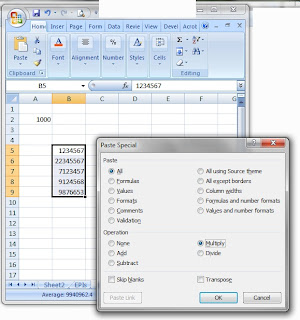
If you have a column of cells that need to be divided by 1000 for example. Here are the steps that you need to follow.
- Type 1000 in a cell lets say A2
- Copy the cell A2 using Ctrl+C
- Select the cells in the column where you would like to let us say multiply the values by 1000.
- Right click and select Paste Special
- Click on Multiply as shown below.

You can do the same for adding or subtracting a specific value from a group of cells.
This tip is particularly useful if you want to show the data that is in millions but want to reduce the number of digits by dividing them by 1000.
Hope this heps.
Tuesday, October 11, 2011
Increasing the number of recent files in SSMS
In Sql Server Management Studio, I usually access my sql query files that I save -- using the File -- Recent Files option. The default setting of the number of recent files to be displayed in SSMS. Today I wanted to access a file that I had used last week and I could not find that file in the recent list.
So I thought of displaying more than the normal 4 files that are displayed in the Recent Files option. So I set out to find where the settings are (as in the microsoft office programs) -- I clicked on Tools -- Options -- General -- The option reads as
Display 4 files in the recently used list. I changed the number 4 to 10.
Now it is starting to display 10 recently used files.
Friday, October 07, 2011
Export directory list in excel
- Yesterday I wanted to export the contents of a folder into excel to provide it to the users for input.
Here are the steps I followed. - Go to Start -- Run -- CMD
- Change to the drive letter of the drive in which the folder you want the contents listed is if you are not already there by typing the drive letter followed by a colon. Eg: d: for going to the d drive.
- Change to the folder of which you want the contents to be exported by using the chane directory command cd. Eg: cd shared/test for changing into the a directory called test which in turn is in the shared direcotry on the d drive.
- Then list the directories using the dir/d comman. This gives the list.
- Right click and click on MAark and select the contents you want to copy.
- After selecting right click again.
- Then paste this into a new excel document.
- Your list of directories is ready.
Wednesday, September 14, 2011
Save SQL Query results into another SQL database
Today I had a requirement to save the results of an SQL query into a sql table. Usually it is easy to export to excel by using the option of copying the results and pasting them to an excel file.
But this time I had over a million rows and I didnot want to use excel to store that huge amount of data. So I followed the following 2 simple steps.
1. Create a new table in a new database:
Use the SSMS to create the database and use the create table query to create the new table as follows:
create table databasename.dbo.tablename
([col1] [varchar(20)], [col2] [int], [col3] [datetime])
2. Create a SQL query using the Insert into command as follows:
Insert into databasename.dbo.tablename
(col1, col2, col3)
select a.col1, b.col2, c.col3 from tab1 a, tab2 b, tab3 c
where a.col1=b.col1 and b.col2=c.col3 and col1='zzz'
This query has inserted data into the new table directly.
Thursday, September 08, 2011
Add months to date in excell
Yesterday I had this requirement to add number of months (m) to a cell that contains start date to estimate the end date. In 2003 I had to use a complex formula like below where A1 is the cell that contians the start date.
=DATE(YEAR(A1),MONTH(A1)+m,DAY(A1))
Well in Excel 2007 it is even more easy to add months with the Edate function like below.
=Edate(A1, m).
=DATE(YEAR(A1),MONTH(A1)+m,DAY(A1))
Well in Excel 2007 it is even more easy to add months with the Edate function like below.
=Edate(A1, m).
Tuesday, August 30, 2011
Using the script task in Management Studio
Today I was taking a back of a database and for the past two days this has become my regular activity. So I thought there should be some kind of recording option (like recording a macro in excel) so that I can just use the recorded action whenever I need to do the same task again and again.
So I tried to investigate and found this script button. So I thought I would investigate this. The following are the steps I followed to backup a database in the Management Studio.

So I tried to investigate and found this script button. So I thought I would investigate this. The following are the steps I followed to backup a database in the Management Studio.
- Right click the database that needs to be backed up.
- Click on Task -- Backup
- Choose the Backup options like how you choose normally.
- Before clicking Ok click on the Script option at the top and choose the option that you want from the 4 options available as shown below.

This has generated a nice script as shown below.
BACKUP
DATABASE [TEST] TO
DISK
= N'C:\Program Files\Microsoft SQL Server\MSSQL.1\MSSQL\Backup\TEST20110830.bak' WITH FORMAT, INIT, MEDIANAME = N'TEST', NAME = N'TEST-Full Database Backup', SKIP, NOREWIND, NOUNLOAD, STATS = 10
GO
This script can be used to do the same task again and again and also may be you can schedule this to be processed at a certain time every day.
Tuesday, August 23, 2011
Windows Firewall Settings on Windows 7
Today I had to access the Windows Firewall to check for blocking of a port. I am used to the command wscui.cpl from the Start -- Run screen of the Windows XP operating system. So I did the same thing on my Windows 7 screen. I was surprised to get the security centre where the Windows Firewall was not visible as shown below.

Luckily I saw the Control Panel Home link at the top and clicked on the link. Then I noticed the Windows Firewall as being a separate entity in the control Paenl and accessed this from there.

Luckily I saw the Control Panel Home link at the top and clicked on the link. Then I noticed the Windows Firewall as being a separate entity in the control Paenl and accessed this from there.
Friday, August 05, 2011
24 HOP -- September 7-8 2011
The registration for the much awaited 24 hours of PASS is now open. Here is an excerpt from the site.
Two Days of Free SQL Server Training!
Don't miss the best 24 hours of free, online SQL Server training in the industry with 24 Hours of PASS: Summit Preview September 7 and 8.
Join us for an exceptional lineup of SQL Server and BI experts, who will be presenting a sneak peek of their PASS Summit 2011 session topics in 24 live webcasts delivered directly to your computer.
Register here to attend these sessions.
Thursday, August 04, 2011
Powershell for SQL Server : An Introduction -- Free webinar
A free webinar is being organised by Idera on Powershell for SQL Server.
Here is an excerpt from the site.
In this session, Microsoft MVP Aaron Nelson will discuss what PowerShell is and demonstrate how and why DBAs should use it. Aaron will step you through the basics of Windows PowerShell and provide you with some commonly used first scripts to help you get started. Register for the webcast today!
The date and time of this webinar is below:
Wednesday, August 10, 2011
2:00 PM - 3:00 PM CST
Wednesday, August 03, 2011
What the password policy of sql server?
Yesterday I had a question in my mind as to what could be the sql server password policy. So I started hunting in the Help menu of the SSMS window. Here is how I found that.

- Click on Help from Sql Server Management Studio.
- Choose contents
- Then choose Security considerations for SQL Server
- Then choose the Password Policy as shown in the screenshot below.

Wednesday, July 27, 2011
Using Countif in Excel
I was using excel today and I wanted to count all the cells in a range only when there is a value greater than 2. So I started hunting for a funciton in excel and found the countif function.
Countif(range,criteria)
But when I started using it like this -- Countif(A1:A100,>2) it didn't work. It was coming up with an error.
So I tried Countif(A1:A100,">2"). This worked. So if we include the criteria in quotes then the formula worked.
I also noticed a sumif function that also works in a similar way. It populates the sum of all the cells in the range specified that satisfy the criteria given.
Friday, July 22, 2011
Webinar-- Best Practices for Sharepoint 2010 upgrade
Shared Squared is running a webinar on 26th July 2011. The topic is -- " Best Practices for SharePoint 2010 Upgrade and Configuration"
Here is an excerpt from the site
The webinar will include various demonstrations and discuss:
•Who should upgrade, why & when
•How to assess existing SharePoint deployments and identify upgrade risks and opportunities
•Specific tasks that need to be done to prepare for SharePoint 2010
•How to identify and upgrade existing 2007 customizations
•Best Practices for supporting parallel environments, migration & preserving the investment in your existing SharePoint deployment
•Avoiding Upgrade & Migration Pitfalls
You can register here
Tuesday, July 19, 2011
Adventure Works for SQL Server Denali CTP3
I came across this link on Codeplex this morning which will be helpful for learing Denali
Here is an excerpt from the site
This release is dedicated to the Adventure Works sample databases and related samples that ship for Microsoft SQL Server code-named "Denali", Community Technical Preview 3 (CTP3). This release uses the AdventureWorks2008R2 and AdventureWorksDWDenali sample databases. They have been upgraded to the "Denali" CTP3 version.
The only change to AdventureWorks2008R2 is the removal of the FILESTREAM dependency. The FILESTREAM properties have been removed from the Production.Document table. No additional schema or data changes have been made.
The only changes to AdventureWorksDWDenali are the additions of the FactProductInventory table, which contains inventory data, and more date data in the DimDate table to fill the years, 2001 to 2006.
These databases cannot be installed on any version of SQL Server other than SQL Server code-named "Denali" CTP3.
Thursday, July 14, 2011
Powerpoint presentation tips
Today I was sitting in a demo presentation and learned a few tips that my colleague Mark Crosby shared.
Did you know that in the slide show mode of the powerpoint presentation if you want to jump to a particular slide, you can just put in the slide number and enter and you can go straight into that slide without coming out of the presentation mode. He also added that if you have the slides printed and numbered it will be easy for you to go to the respective slide if you know the number of the slide.
Another tip he shared is by pressing the 'B' key you can pause the presentation so that the audience concentrate on you rather than on the presentation. The screen turns black. You can resume the presentation by pressing the same 'B' key.
Pressing the 'W' key will make the screen white instead of black and resuming the presentation can be done by pressing the 'W' key again.
I thought these tips will be helpful for all you presenters out there....
Free TSQL Webcasts Start Next Week
In SSWUG.ORG’s “Writing T-SQL Queries and Code” webcast series, you will be able to learn how to write aggregate and crosstab queries, as well as how to use common table expressions to write recursive queries.
In three, in-depth sessions, Kathi Kellenberger, SQL Server Technology Specialist for Microsoft and author of Beginning T-SQL 2008, will teach beginning and experienced T-SQL programmers about writing code to ensure their applications are highly performing.
By the end of the series, you will be more familiar with T-SQL queries and know how to simplify your work through new and advanced features.
Learn more about the virtual webcast content and register today.
Monday, July 11, 2011
Adding Hyperlinks in Crystal Reports
Last week one of my colleagues asked whether there is a possibility to add hyperlinks in crystal reports. I thought that is a good question but felt that you could add and so started searching for an option in crystal reports. Here is what I found.
When you select a particular field for which you want to hyperlink and rightclick and choose the option format field. There is a tab called hyperlink and there are variety of options to add a hyperlink as shown below. As you can see the options to add a hyperlink are a link to a website, an email address, a file, current email field value and current website field value.
When you select a particular field for which you want to hyperlink and rightclick and choose the option format field. There is a tab called hyperlink and there are variety of options to add a hyperlink as shown below. As you can see the options to add a hyperlink are a link to a website, an email address, a file, current email field value and current website field value.

Thursday, July 07, 2011
What is Google + ?
In the past one week I have heard this term Google+ so many times that it intrigued me to find out what exactly this is. I am sure some of you may have heard it too. So I resorted to Google and here is an excerpt from the cnet site.
For now, Google is quick to call Google+ a "project," and acknowledged that the social service still has "rough edges." However, it currently has a host of features to help people communicate over the Web with friends and family.
Google+ is designed around "Circles" that allow users to group people within their social sphere into different categories. Google says that the people you tend to meet up with on Saturday nights, for example, can be grouped into their own category, while parents can be placed into another. You can then decide to share only certain information with different Circles.
In addition, the social service includes a feature called Hangouts that lets you find others who are "hanging out" on the Web. If you decide to join a given hangout, you'll be able to engage in a video chat with the others there. Google+ also comes with an Instant Upload option that automatically uploads all photos and videos from your phone to your profile. From there, you can decide who to share that content with.
Read more:
Thursday, June 16, 2011
Have you heard of Microsoft Dreams Park?
This morning I came across this web site by Microsoft called "Microsoft Dreamspark" They have training videos, reading material and provide microsoft professional tools free of cost for students to practice.
Please have a look and sign in and take advantage
Please have a look and sign in and take advantage

Tuesday, June 14, 2011
SQL Disaster Recovery Event from SSWUG
Here are the event details from SSWUG.
Attend the Free SQL Disaster Recovery Event
SSWUG's free virtual expo will showcase several ways to prevent a SQL Server disaster and how to recover the database in the event of loss or damage. Through the in-depth sessions with some of the leading SQL Server experts in the information technology (IT) field, you will see many demonstrations and examples on anticipating and reducing the likelihood of a database tragedy. Learn more about the virtual expo content and register today.
Monday, May 23, 2011
Microsft outlook export option
A couple of days ago my manager asked whether there is a way to convert appointments recorded in outlook into a report so that the data need not be double handled.
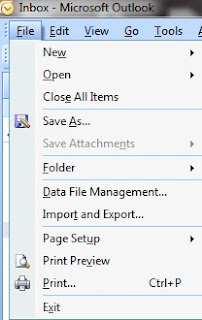
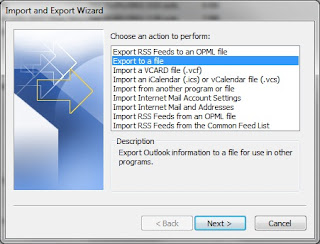
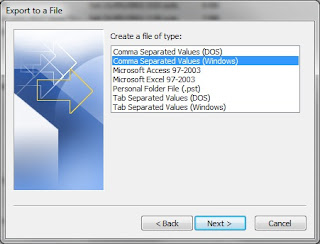
I thought there should be some sort of an export option provided in outlook and started exploring the menus in outlook. Sure enouth there I found under the File menu an option called Import and Export as shown below.

I chose the export to file option as shown below.

I them chose the csv for windows option as shown below.

In the next screen I chose the calendar folder and specified the dates to export and the path and the file name. The csv file was exported with all the different fields.
Friday, May 20, 2011
Free SSAAS Expo again from SSWUG
SSWUG.ORG’s virtual expo will review various aspects of SQL Server Analysis Services (SSAS), which enables the server to be used for analytical processing and data mining.
Through our in-depth sessions with four of the leading experts in the information technology (IT) and business intelligence (BI) fields, you will see many demonstrations and examples on designing, creating and managing data from multiple sources.
By the end of theevent, you should have the tools and understanding needed to bring added functionality, automation and insight into your data.
Sessions will cover the following topics:
Common Mistakes with SSAS Cube Designs
SSAS Partitioning and Aggregation Strategies
Properly Using the SSAS Query Cache
Overcoming SSAS Implementation Issues
Building a Scalable SSAS Solution
Best Practices for Performance and Tuning Techniques
Click here to Register!
Thursday, May 19, 2011
Free Webcast Series on Sharepint 2010 from SSWUG
SharePoint beginners and experts can benefit from attending SSWUG.ORG’s “SharePoint 2010 Basics” webcast series, which will delve into what you can do with the newest version of SharePoint and how the platform can benefit your business.
In four, in-depth sessions, Rebecca Isserman, SharePoint Server MVP and Consultant for Planet Technologies, will explain how to use the platform’s key features, create sample applications in the development environment, blend Silverlight applications with SharePoint and more.
By the end of the series, you will know about the various and available environments and tools you can use to develop a functional and optimized SharePoint project.
Click here to see the session schedule.
Click here to register.
Wednesday, May 04, 2011
Restore folder in Sharepoint
We heavily use a customised feature of Image Library on sharepoint 2007 which is our Intranet. One of the new users yesterday had deleted a whole folder from this library and wanted us to restore this. Now we have never done a restore onto the sharepoint.
So I started investigating the sharepoint settings as to how to solve this problem rather than looking at the backup to restore.
So this is what I found! a Recycle Bin in the Sharepoint. And there are the files from the folder that was deleted neatly sitting in there. Wow that's a learning for the day I thought.
So here is the path as to how I found the Recycle Bin.
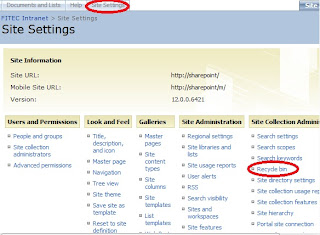
So I started investigating the sharepoint settings as to how to solve this problem rather than looking at the backup to restore.
So this is what I found! a Recycle Bin in the Sharepoint. And there are the files from the folder that was deleted neatly sitting in there. Wow that's a learning for the day I thought.
So here is the path as to how I found the Recycle Bin.
- Click on the Image Ibrary on the intranet
- Click on site settings
- Click on Recycle Bin which is under Site Collection Administration as shown below.

Tuesday, May 03, 2011
Free MDX Webcast Series by SSWUG
Explore the basic functions of MDX and view many practical examples on using the query language in SSWUG's "Introduction to MDX" webcast series.
In three, in-depth sessions, Business Intelligence architect and MDX expert Bill Pearson will focus on the basic components of MDX, as well as provide information on crafting simple MDX expressions and queries that generate result sets.
Click here to see the Session dates
Click here to see the Session Schedule.
I think these sessions will be particularly useful for beginners.
Friday, April 15, 2011
ATBroker.exe
Last night when I tried to access my computer from home via Remote Desktop Connection an error came up as shown below.


This is the first time I have encountered with this error. Since I had lots of work to do I logged on to one of the servers and did my work thinking that the error will disappear when I access the actual machine in the morning. But to my surprise the error persisted when I switched on the monitor in the morning. So I tried the usual Ctrl+Alt+Delete. And there lies the familiar screen which made me relax as shown below.

So I chose the Start Task MAnager option and luckily got into the computer. But I am not sure why the error has come up. Have any of you had this error before? If so what did you do? And do you know why this error came up?
Thursday, April 07, 2011
Increasing SQL SERVER Memory
In one of our server audits it was discovered that only one third of the memory has been allocated to the sqlserver instance. Questions were asked whether multiple instances of sql server are present. But when there was no other instance of sql server running it was recommended that we increase the memory allocated to double from 10 GB to 20 GB.

1) RDP to the SQLServer and sign on
2) Open up SQL Server Management Studio
3) Select the SQL Server in the Object Explorer on the left
4) Right click and select Properties
5) Select Memory tab as shown below
6) Change Maximum Server Memory from 10240 to 20480
7) Click OK

Close Management Studio
As a precaution restart the server. It is better if you do it after hours.
Tuesday, April 05, 2011
I had a strange problem today. I went to the website I have developed and maintain and tried to click on the print button and expected to get a normal printout. But instead was surprised to get a blank print out with just the header and footer.
I thought I haven't changed any code why did it stop working. I just assumed that it was not working for anyone without testing on other computers. After about 15 min. I had a request from another colleague to print from some other govt. website. So I hit the print button provided on their website. Then the output was the same with the blank page being printed with just the header and the footer.
Then I have asked one of my other colleagues to print and he could print. Only then I have realised that the problem is with my print spooler.
So developers beware of this problem. You might also face this stuation at some stage.
So the following are the steps that I have taken to restart the print spooler.
- Right click on 'My Computer' -- and choose Manage
- From the left hand menu -- choose Services and Applications
- Then click on Services
- From the list that appears on the right hand side choose Print Spooler as shown below.

Stop the service and start it again.
Now the important part : If you test Print form the same browser session the print might not work. Make sure that you open a new session and print.
Thursday, March 31, 2011
Power Switch for a blade server -- an interesting find
We had a power outage for about 6 hrs at our office and the UPS would last only for 1 hr. We decided to do a managed shutdown of the servers and then power them back up the next day when the power came back up. I was responsible for coming early in the morning and switching on all the servers.
As mentioned in an earlier post our systems administrator is no longer with us, Andrew joined us to take over this role. He did the shut down part the previous night and called and said that he cannot find the power switches for the blade servers. I also didn't know where the power switches for the blade servers were. I have asked him to go home and said that I will deal with that in the morning.
Now the image below is how the blade server looks.

As you can see there is no way you will know that there is no power switch that is visible to the human eye. I did a lot of googling the night before to get some insight but could not find any documentation. For those who have dealt with the blade servers this could be very easy. But finally I figured out that the glass apnel above can be opened. When that was opened there lies the hidden power switch neatly as shown in the image below highlighted in red.

Friday, March 25, 2011
The keyboard shortcuts I use
Yesterday I was working with my colleague and she was surprised with the number of shortcuts I use with Windows Key .
So I thought I could list all the shortcuts for the benefit of her and others
To open the Start Menu -- just click Windows Key
To open the windows exlpoer -- click Windows Key + E
To open the seach/find window -- click Windows Key + F
To display the desktop by minimising all the open windows -- Click Windows Key + D (I have found this really helpful)
To lock your computer -- click Windows Key + L (Easy to remember)
To open the run command -- click Windows Key + R
To display the Help window -- click Windows key + F1
To zoom in the screen -- click Windows Key + =
To Zoom out the screen -- click Windows Key + -
To go through the open windows one by one -- Windows Key + Tab (Similar to Alt+Tab) but the display is really nice.
If you have windows open and your windows 7 gadets are hidden behind them you could bring them on top of the applications you use -- Windows Key + G
If you use two screens -- two helpful shortcuts are
Moves the current windows to the left screen, when running dual monitors -- Windows Key + Shift + Left arrow
Moves the current windows to the right screen, when running dual monitors -- Windows Key + Shift + Right arrow
There could be other shortcuts which you also might be using. Please let me know so that I could start using them as well.
Wednesday, March 23, 2011
Have you heard about Channel 9?
I stumbled across Channel 9 yesterday while researching. Channel9 is a Microsoft maintained site which is full of videos, blogs, shows, series etc. There is too much information on this site for one to absorb and learn.
Here is the link to the site. I hope you will enjoy this learning.
Here is the link to the site. I hope you will enjoy this learning.
Monday, March 07, 2011
Data Mining and Analysis -- Free Expo from SSWUG
Here is another Free Expo Event from SSWUG that covers Data Mining and Analysis. The event is scheduled for March 18th 2011 from 9 am to 12 pm PST.
Sessions will cover the following topics:
You can register now if you would like to learn from three skilled data mining experts.
Sessions will cover the following topics:
- Using Data Mining Plugins with Excel
- Developing SQL Server Data Mining Models
- Understanding Data Mining APIs
- Finding Patterns and Relationships in Server Data
You can register now if you would like to learn from three skilled data mining experts.
Friday, March 04, 2011
Conditional formatting using multiple conditions - Excel 2007
Today I had a requirement to colour code in Excel based on a few conditions. At first I thouhgt I could use thre to four rules in the conditional formatting to achieve this result but when I did that the results that I was getting was not very satisfactory. So I thought I would try the And function of excel in conjunction with the conditional formatting and it worked wonders.
Here are the steps I followed to achieve what I was after.
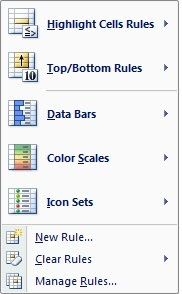
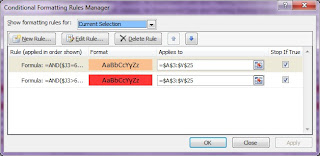
I wanted the entire row to be highlighted in a certain colour based on three conditions.
Here are the steps I followed to achieve what I was after.
- Select all the data that you want to colour code.
- Click on Conditional Formating on the Home Tab
- Choose Manage Rules as shown below

- From the dialog that appears click New Rule.
- Add the multiple conditions using the And function in the formula box
- The most important thing you need to do when you are adding the formula to highlight rows is to remove the $ sign that gets assigned when you choose the cell for entering a formula with a mouse.
- Choose the colour by clicking the format button and click ok
- Click Ok again to come out of the Manage Rules window.
As you can see below I have added two rules and it is giving me the result that I want.

Thursday, March 03, 2011
Have you heard about Snipping Tool?
Thanks to one of my colleagues, yesterday I learnt about the Snipping Tool which is avaibale in Windows 7. To activate the tool -- Click on Start -- All Programs -- Accessories -- Snipping Tool. A screenshot of the tool is shown below.

Snipping tool enables you to select an area on your desktop or the entire desktop using your mouse and save this as an image for future use.
Until now I used to use the key board shortcuts PRintscn for capturing a screenshot of the entire desktop or Ctrl + Alt + PrintScn to capture the active window. Then open Paint and then save as an image.
Until now I used to use the key board shortcuts PRintscn for capturing a screenshot of the entire desktop or Ctrl + Alt + PrintScn to capture the active window. Then open Paint and then save as an image.
Only drawback of the snipping tool that I found was if you have try to capture a screenshot of the values in a drop down of the filter feature of the excel, you could not do that using the Snipping Tool as you are trying to use your mouse to invoke the snipping tool. When you do this the drop down disappears in excel and hence you cannot take a screenshot of what is not appearing on your screen.
But the command that I always used Ctrl + Alt + PrintScn worked as shown below.

If anyone of you know of a workaround for this I would be pleased to know about it.
Tuesday, March 01, 2011
Processing of SSAS cube -- steps for beginners
I thought today I will cover the steps that can be followed to process a Sql Server Analysis Services Cube from Sql Server Management Studio.
The assumption is that you already have a cube that is built in SSAS and you would like to process this cube from sql server management studio
Step 1
Connect to the sql server analysis services instance from the sql server management studio as shown below.

Step 2
From the left hande side menu click on the plus beside Databases.
Step 3
Right click on the cube that you would like to process as shown below.

Step 4
The following dialog appears. Click on change settings if you need to and click on OK. Depending on the amount of data the processing takes a few minutes upto a few hours.

Tuesday, February 22, 2011
Have you used Outlook Anywhere?
Since our systems administrator left our company I have had a lot of opportunity to learn about things outside my normal coverage area. I am very thankful to my manager Ashley for giving me that opportunity.
In one of the meetings I sat with the external consultants 'Outlook Anywhere' was mentioned.
Outlook Anywhere is one of the Exchange 2007 feature that Microsoft has developed. The consultant mentioned that the Outlook Anywhere is a remote access method for Outlook Clients to connect through the internet to the exchange server without the need for a VPN.
This was not configured in our Exchange Server and explained the two main benefits as follows:
- There is no need for a vpn connection to be on to access Outlook Anywhere.
- If there is an internet connection available then you can just login to Outlook Anywhere and access your email.
My first linked server -- SSMS 2005
Yesterday I was exploring Sql Server Management Studio, when I spotted Linked servers. I thought I will investigate what that and started trying out the options. So I right clicked on linked server, only three options came up as shown below.

I clicked on the New linked server .
I was browsing through the provider list as shown below and was keen to learn more about the provider for Microsoft Directory Services.

I thought I will experiment by using excel hence I gave the product name as excel, and data source -- a file in my c directory. But did not know what to give as a Provider string and location. I just gave the Provider as Excel 8.0 which is commonly used for excel in reports. Left the location blank and clicked ok.

To my surprise there was no error and the Test linked server was created as shown below.
So I right clicked on the test and chose TEst connection and the connection succeeded.
I am happy that it all went well but yet since there were no other options that are visible on how to use this linked server I thought I would find out when I had a bit more time on hand. So I will post my findings in another post.
Monday, February 21, 2011
Managind SQL Server Source Code -- Webinar
Here is the information on very interesting topic -- Managing SQL Server Source code. Here is an excerpt from the communication I have recieved from MSSQLTips
Live Webinar: Managing SQL Server Source Code
Now is the time to properly manage source code in SQL Server. Put an end to the chaos and stress of having to manage source code in a haphazard manner. Source control for application code has been the norm for years, but that is not necessarily the case with SQL Server code.
Come to this web cast to learn how to manage SQL Server source code with simple, predictable steps. We will show how to do so with tools you already have in addition to a solution from Red-Gate that integrates directly with SQL Server Management Studio.
Click here to register
Thursday, February 17, 2011
Excel Web Access Error in Sharepoint 2007
I wanted to use Excel Services on Sharepoint 2007 to migrate some of our BI reports from a third party application that we use. So I tried publishing to Excel Services from Excel 2007 assuming that our Sharepoint was setup to be used with Excel Services.
When I tried to publish and open in a browser I started getting an error "Excel Web Access: An error has occurred ".
When I checked the event log the following was logged in the event viewer.
There was an error in communicating with Excel Calculation Services http://sharepoint:56737/SPAdmin/ExcelCalculationServer/ExcelService.asmx exception: The request failed with HTTP status 401: Unauthorized.
[Session: (null) User:[Domain\user].
I have followed all the following steps to get to this stage.
- I have created a document library
- Added this document library as a trusted file location
- Added the document library to trusted data connection libraries
- Also ensured that the user being used has the proper rights in each of the databases
- Started the single signon service
- Ensured that the Excel Calculation service is running
Still the error was persistent. After a lot of struggling for 3 days, I finally fixed the problem by removing the integrated windows authentication option on the ExcelCalculationServer folder from the Office Server Web Services website on IIS.
Tuesday, February 15, 2011
SSIS Free Expo Event
Here is another Free Expo Event from SSWUG that covers Basic and Complex SSIS Features. The event is scheduled for February 18th 2011 from 9 am to 1 pm PST.
Sessions will cover the following topics:
Speakers include the Knights of Pragmatic Works, a very good reason to attend :)
Register now
Sessions will cover the following topics:
- SSIS Sorting and Package Protection
- SSIS Package Checkpoints and Transactions
- SSIS Native Logging Features
- Best Practices with SSIS Package Design
- Deploying, Scheduling and Administering SSIS in Production
- Real-world Business Scenarios with SSIS
Speakers include the Knights of Pragmatic Works, a very good reason to attend :)
Register now
Monday, February 14, 2011
Friday Backup Job
As mentioned in an earlier post since our systems administrator left our company I am taking care of the backups until the position is replaced. The backup scheduled for last Friday failed as the backup agent was stuck on a server. Since it was the weekend I thought I will rerun the backup after fixing up the cause. I had a look at the log and restarted the server where the backup agent was stuck.
Now I wanted to reschedule the Friday backup as it is with the same features as to going into the same tape (we have multiple tapes in the backup rack). So I was looking for some options as to how to do this when I saw the option "Retry the Job Now".

So I thought I will try this option. What I expected was the backup job to finish earlier as the ob was sstuck on the last server. So I expected it to be finished within an hour. But when I didn't get the alert even after 4 hrs, I started to get worried and logged in to check what was happening. Only then I realised that the backup was running from he beginning. This was the first time I tried this option and worked very well as the job has completed in the way I wanted without much configuration.
As you can see Clean Drive job failed and I will have to resolve this as well. :)
Another learning for me.
Thursday, February 10, 2011
24 Hours of PASS Registration Now Open
As mentioned in my earlier post the SQL PASS 24 hr sessions are scheduled for March 15-16 2011. Registration is now open for these sessions.
Here is an excerpt from the site.
The LiveMeeting webcasts will begin at 12:00 GMT (8am ET) on March 15 and run for 12 straight hours. They start again on March 16 for another 12 hours. This is your chance to join the elite group of hardcore #24HOP veterans who watch all 24 sessions! Learn more and register today!
Wednesday, February 09, 2011
Sharepoint usage reports
Our Systems Administrator left our company last week after being 8 years with us. I have taken over the administration of our intranet which uses Sharepoint 2007 MOSS. I started to explore the site settings of the sharepoint web front end (WFE) from the past 2 days. I was excited when I saw the term site usage statistics under site administration as shown below.

But my excitement died down after seeing the following message. I wondered why our system adminsitrator did not set up the usage statistics. :(

So now I started exploring as to how to enable the usage statistics. So I logged into the sharepoint server and opened the central administration and started exploring application management and operations tabs. Finally under the Operations tab I found the Loggin and Reporting section as shown below.

I clicked the Usage Analysis Processing and looked at the options to set. I was surprised to see just 2 settings to enable site usage reports.

I have set them and will be monitoring the usage from now on. I am pleased with my learning and little discovery today.
Wednesday, February 02, 2011
Sharepoint Administration Expo By SSWUG -- February 11 2011
Here is a link to the Free Sharepoint Administration Expo organised by SSWUG on February 11th 2011 from 9 am to 1 pm PST
Sessions will cover the following topics:
* Configuring SharePoint Anonymous Access: Tips and Tricks
* Understanding SharePoint Blogs, Wikis, and Discussion Boards
* Letting Go - It's so hard to do
* Infrastructure deployment via infrastructure and features
This expo is all about providing the foundation for providing outstanding service with SharePoint by SSWUG.
Hope these sessions are useful for some of you
Tuesday, February 01, 2011
Print formuals from Excel 2007
Yesterday I had a requirement to compare formulas between two sheets. So I wanted to print the formulas and compare. This is a basic feature but I straight away did not know how to do it. So I started investigating the ribbon in Excel 2007.
After about 2-3 minutes Voila I found this.
Under Formulas Tab -- There was Show Formulas button in the Formulas Auditing Group as shown below. This button works as a toggle for showing and hiding the formulas.
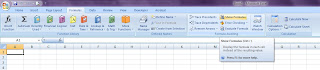
After about 2-3 minutes Voila I found this.
Under Formulas Tab -- There was Show Formulas button in the Formulas Auditing Group as shown below. This button works as a toggle for showing and hiding the formulas.

Thursday, January 27, 2011
24 Hours of PASS March Sessions Announced
The 24 Hours of Pass sessions for March 2011 have been announced. Here is an extract from the site.
Hear from SQL Server and BI experts such as Jen McCown, Karen Lopez, Michelle Ufford, Wendy Patrick and Cindy Gross, just to name a few! Check out the great sessions in store and be sure to save the dates. Online registration will open soon; visit the 24 Hours of PASS website often for information updates.
Here is a list of the sessions in the BI Track, DBA Track and Dev Track. Can't wait to register!
BI Track
Session 02 (BI) – Start time 13:00 GMT on March 15
Dashboards Design and Practice using SSRS
Presenter: Jen Stirrup
Session 05 (BI) - Start time: 16:00 GMT on March 15
Cool Tricks to Pull From Your SSIS Hat
Presenter: Julie Smith
Session 09 (BI) – Start time 20:00 GMT on March 15
Multidimensional Thinking
Presenter: Stacia Misner
Session 12 (BI) – Start time 23:00 GMT on March 15
Many-to-Many Dimensions – ETL to Cube
Presenters: Lisa Phillip
Session 13 (BI) – Start time: 12:00 GMT on March 16
Reporting Services 201: the Next Level
Presenter: Jes Borland
Session 17 (BI) - Start time 16:00 GMT on March 16
Tips & Tricks for Dynamic Reporting Services Reports
Presenter: Pam Shaw
Session 19 (BI) - Start time 18:00 GMT on March 16
Intelligent ETL with SQL Server
Presenter: Jyoti Gupta
Session 20 (BI) - Start time 19:00 GMT on March 16
Clever Queries: Crafting MDX Queries to get the Most out of SSRS
Presenter: Erika Bakse
Session 22 (BI) - Start time 21:00 GMT on March 16
What You Don’t Know about SSRS 2008R2
Presenter: Kathi Kellenberger
DBA Track Session 01 (DBA) – Start time 12:00 GMT on March 15
SQL Server AlwaysOn: the Next Generation High Availability Solution
Presenter: Lara Rubbelke
Session 04 (DBA) - Start time 15:00 GMT on March 15
SQL Server Performance Tools
Presenter: Cindy Gross
Session 07 (DBA) – Start time 18:00 GMT on March 15
SQL Server Performance
Presenter: Isabel de la Barra
Session 10 (DBA) – Start time 21:00 GMT on March 15
Bad Plan! Sit!
Presenter: Gail Shaw
Session 11 (DBA) – Start time 22:00 GMT on March 15
Indexes and Execution Plans
Presenter: Kim Tessereau
Session 14 (DBA): Start time 13:00 GMT on March 16
Replication, Log Shipping and Mirroring: Oh My!
Presenter: Wendy Pastrick
Session 16 (DBA) – Start time 15:00 GMT on March 16
All about SQL Server Memory Settings for DBAs
Presenter: Vyshnavi Thota
Session 23 (DBA) - Start time 22:00 GMT on March 16
Index Internals for Mere Mortals
Presenter: Michelle Ufford
Session 24 (DBA) - Start time 23:00 GMT on March 16
TwitterData on Azure (end-to-end demo) – How We Did It
Presenter: Lynn Langit
Dev Track
Session 03 (Dev) - Start time 14:00 GMT on March 15
Spatial Data: Cooler Than You’d Think
Presenter: Hope Foley
Session 06 (Dev) – Start time 17:00 GMT on March 15
No More Bad Dates: Using Temporal Data Wisely
Presenter: Kendra Little
Session 08 (Dev) – Start time 19:00 GMT on March 15
T-SQL Code Sins: The Worst Things We Do to Code and Why
Presenter: Jen McCown
Session 15 (Dev) – Start time 14:00 GMT on March16
Entity Framework: Not as Evil as You May Think
Presenter: Julie Lerman
Session 18 (Dev) – Start time 17:00 GMT on March 16
T-SQL Awesomeness: 3 Ways to Write Cool SQL
Presenter: Audrey Hammonds
Session 21 (Dev) – Start time 20:00 GMT on March 16
Five Physical Database Design Blunders and How to Avoid Them
Presenter: Karen Lopez
Tuesday, January 25, 2011
SQL Bits Content
I came across this link on SQL Bits where there are about 164 videos on various aspects of SQL Server and sharepoint which I found useful. Altogether there are 215 articles.
Have a look at the compiled sessions and content page.
Have a look at the compiled sessions and content page.
Friday, January 14, 2011
SSWUG Free Expo Event: SQL Server Performance Monitoring and Tuning -- Jan 14 9 am to 1 pm PST
Today I received an email about the free virtual expo from SSWUG
Here is an excerpt from the email.
Sessions will cover the following topics:
With registration, all attendees will also receive a complimentary month of full membership to SSWUG.org, where they can learn even more about SQL Server and other databases and database technologies through in-depth articles, podcasts, how-to videos and more. All the content will also be able for seven calendar days after Jan. 14, allowing attendees to revisit key portions of information at a convenience.
Please register now to save your place for this information-packed expo!
So register and enjoy!
Here is an excerpt from the email.
Sessions will cover the following topics:
- SQL Statement Tuning with Indexing Strategies (Presented by Kevin Kline)
- Performance Tuning SSIS (Presented by Brian Knight)
- Using DMVs to Diagnose Performance Issues with High OTLP Workloads (Presented by Glenn Berry)
- Implementing Resource Governor (Presented by Buck Woody)
With registration, all attendees will also receive a complimentary month of full membership to SSWUG.org, where they can learn even more about SQL Server and other databases and database technologies through in-depth articles, podcasts, how-to videos and more. All the content will also be able for seven calendar days after Jan. 14, allowing attendees to revisit key portions of information at a convenience.
Please register now to save your place for this information-packed expo!
So register and enjoy!
Thursday, January 13, 2011
Shortcut to enable Fullscreen in SSMS
Today I was experimenting with the query results in Sql server management studio and saw this shortcut in he View menu of the SSMS.

So in order to show full screen I tried the shortcut -- Shift + Alt + Enter. The same shortcut works to come out of the full screen mode as well. What the full screen does is closes all the other windows and like object explorer, registered servers etc that you have open and maximises the query and results windows.
Likewise if you want to go to the properties just press F4.
To get the Solution Explorer window the shortcut is Ctrl + Alt + L
To get the Toolbox window -- the shortcut is Ctrl + Alt + X
Hope these shortcuts are useful for you.
Sunday, January 09, 2011
Have you heard about BizIntelligence TV ?
Yesterday I came across this blog on MSDN by Bruno Aziza.
Bruno says that Biz Intelligence TV is a new and innovative way to let industry leaders express and gain access to thought-leadership on Business Intelligence. The goal of the BizIntelligence.TV program is to start an ongoing conversation by providing compelling content from peers and industry stars.
Here is the Biz Intelligence TV channel on Youtube
Friday, January 07, 2011
SSIS 2008: Tips and Tricks video by Steve Swartz
Today I listened to this very good informative video by Steve Swartz which I wanted to share with you all.
This is a presentation by Steve Swartz in the Microsoft TechEd Europe 2010. In this presentation Steve says that he desires to teach you how to fish rather than give the fish itself.
Thanks to Steve for posting this.
This is a presentation by Steve Swartz in the Microsoft TechEd Europe 2010. In this presentation Steve says that he desires to teach you how to fish rather than give the fish itself.
Thanks to Steve for posting this.
Thursday, January 06, 2011
SSAS Interview Questions
I was looking for some SSAS interview questions and found some very good resources on the web.
The links are below.
SSAS Interview Questions from Siddharth Mehta's blog
Sql Server 2005 Analysis Services Interview Questions
Dave Rodabaugh's Analysis Services interview questions
SSAS MDX Query interview questions
SSAS interview questions for MDX from Learn Microsoft BI
MDX Questions from datawarehousing guide
Hopefully these resources are useful for you as well.
Saturday, January 01, 2011
Happy New Year 2011 to Everyone
My first post this year is to wish all the readers here a HAPPY NEW YEAR!
As the new year blossoms, may the journey of your life be fragrant with new opportunities, your days be bright with new hopes and your heart be happy with love!
My main new year resolution is to start the certification process to achieve Microsoft Certified Technology Specialist (MCTS) Microsoft SQL SERVER 2008, Business Intelligence Development and Maintenance.
I have no doubt I will be using all the resources available here on BIDN in addition to getting some formal training in order to achieve that.
I look forward to all the suggestions in order to achieve this from all of the certified professionals in this area.
Friday, December 17, 2010
SSIS + CDC = SCD -- A PASS webinar on 20th December by Patrick LeBlanc
I got interested in the title of this webinar and hence thought that all of you might be interested in this webinar event as well. Below are the details
Date / Time
Date:
12/20/2010
Start Time:
12:00:00 PM
End Time:
1:00:00 PM
Timezone:
(GMT-05:00) Eastern Time (US & Canada)
Short Description
Building dimensions using the Slowly changing dimension wizard in SSIS is simple and quick. However its performance and flexibility is questionable. Even further, when trying to perform incremental loads of your Dimensions using the aforementioned approach or a custom approach prior to Change Data Captured (CDC) offered certain challenges. In this session Patrick will show you how to utilize CDC and SSIS to incrementally load Type I and Type II dimensions ;using features that are all native to SQL Server 2008.
Event Description
Speaker: Patrick LeBlanc
Patrick LeBlanc, SQL Server MVP and Author, is currently a Business Intelligence Architect for Pragmatic Works. He has worked as a SQL Server DBA for the past 9 years. His experience includes working in the Educational, Advertising, Mortgage, Medical and Financial Industries. He is also the founder of TSQLScripts.com, SQLLunch.com and the President of the Baton Rouge Area SQL Server User Group. Patrick is a regular speaker at various SQL Server community events and a PASS Regional Mentor.
Mon Dec 20th 12pm EST SSIS + CDC = SCD
URLhttps://www.livemeeting.com/cc/usergroups/join?id=53BGCZ&role=attend&pw=3%3C%2C9%27CDcs
Thursday, December 16, 2010
SQL Azure free trial
Here is a link to the special free trial offer for SQL Azure
For a limited time, new customers can sign up for SQL Azure and get a 1GB Web Edition Database for no charge…and no commitment. We ask for your credit card information when you accept this offer, as any additional usage per month will be billed at the standard rate. This is a great way to try SQL Azure – and the Windows Azure platform – without the risk.
For a limited time, new customers can sign up for SQL Azure and get a 1GB Web Edition Database for no charge…and no commitment. We ask for your credit card information when you accept this offer, as any additional usage per month will be billed at the standard rate. This is a great way to try SQL Azure – and the Windows Azure platform – without the risk.
Friday, December 10, 2010
Denali Resource Centre
This morning I found the following link on the MSDN blogs that is quite useful. There are plenty of articles and links to community blog posts, as well as 12 videos about the new functionality in SSIS.
Head over to the SQL Server Denali Resource Center.
Enjoy Denali using this resource centre
Head over to the SQL Server Denali Resource Center.
Enjoy Denali using this resource centre
Tuesday, November 30, 2010
Enable Macros in Access 2007
We have a couple of access programs that we use for data conversions. These programs convert the csv files that are generated from our CRM to a fixed file format that is then uploaded to interface with other government institutions.
With the introduction of OFfice 2007 there is this extra step that the users were required to do to enable macros manually every time they use these programs.
I thought this manual should not be there for the users so I set out to look at all the options available to automate this step.
HEre are the results.- Open the access file -- click on the office button at the top and click on Access Options
- From the menu that appears choose the Trust Centre and click on the Trust Centre Settings.
- From the menu that appears choose Macro settings and Enable (the fourth option) and click ok.
- Next time when you open the porgram the annoying notification where there is a tendency to forget to enable will disappear.
Friday, November 26, 2010
39 videos on Microsoft BI Tools
I stumbled across this site today that contains very useful videos on Microsoft BI tools.
There are 39 videos of which I have listed the top five from thier site here.
There are 39 videos of which I have listed the top five from thier site here.
- The first video is a twelve minute introduction entitled "What is Business Intelligence?" This video covers what is meant by terms such as data warehousing and business intelligence and why companies undertake such projects.
- The second video is a 34 minute overview of how a single data warehouse can be used to deliver business value to a wide variety of users through scorecards, dashboards, reports, analytic applications, and custom applications.
- The third video discusses the process of data warehousing, from the initial problem definition through the creation of the cubes and delivery of the data. This video runs 19.5 minutes.
- The fourth video is "Why Business Intelligence Projects Fail (and what you can do about it)." This covers some of the primary reasons that BI projects fail along with tips for addressing the problems. This video is 32.5 minutes in length.
- The fifth video is "Introduction to Business Intelligence Development Studio" and covers the primary tool used to create data warehouses. This is the environment for creating SSIS packages, SSAS cubes, and SSRS reports. This video runs 15.5 minutes.
So go ahead and register and enjoy the videos
Thursday, November 25, 2010
Show/Hide Office Ribbons
Yesterday I was in a presentation and because we wanted to see most of the screen, there was a requirement to hide the top ribbon see the image below.

I suggested to double click on the menu item to hide the ribbon. That is, double click either on Home, Insert, Pge Layout etc.
Someone in the room suggested a keyboard shortcut Ctrl+F1. That worked too.
Also keep in mind that this works across all Office 2007 and 2010 applications including Excel, Powerpoint, Access, Outlook etc.
I thought of sharing this here so that in case you have a similar requirement you could use it.
Tuesday, November 23, 2010
Project Crescent BI Tool for Denali
I found the following interesting announcement on the SilverLight Team Blog about Project Crescent.
Here is an extract from the announcement.
Project Crescent allows business users to manage data and show information in a truly innovative and exciting way, allowing people to visualize, interact and report on data using highly interactive visualizations, animations and smart querying.
One of Crescent’s most exciting features is its integration with PowerPoint. Through a feature called Storyboarding, users can embed reports in PowerPoint and manipulate the live data during a presentation.
Wednesday, November 17, 2010
New Path to Microsoft Certified Master (SQL Server 2008)
I came across an interesting blog link yesterday by Joseph Sack which outlines the new path to get certified for Microsoft Certified Master.
The current MCM program requires you to take three written exams and a six hour lab exam which would cost around 15,000 USD.
The new MCM program requires you to take a knowledge exam and a lab exam which would cost $2500.
In his blog, Joseph says -- "It’s our goal to reach the SQL Server experts worldwide who may be qualified to achieve MCM certification, but who’ve run up against the previous barriers of time, cost and location. By reducing or removing these barriers, while keeping the integrity and value of the certification, we expect to grow the community of SQL Server MCMs and increase its visibility and awareness of its value."
I hope this helps all the people who are trying to get certified as MCM.
Tuesday, November 16, 2010
PASS Summit 2010 Day 2 Keynote recording
If you have missed the PASS Summit ay Two Keynote by Quentin Clark you can view the recodring below.
PASS Summit DAy TWo KeyNote Recording
Speaker: Quentin Clark, General Manager of Database Systems Group at MicrosoftWith opening remarks from Bill Graziano, VP Finance at PASSQuentin Clark will showcase the next version of SQL Server and will share how features in this upcoming product milestone continue to deliver on Microsoft’s Information Platform vision. Clark will also demonstrate how developers can leverage new industry-leading tools with powerful features for data developers and a unified database development experience.
Monday, November 15, 2010
PASS Summit -- Women In Technology luncheon recording
If you have missed the WIT Luncheon live streaming event, you can now click on the below link to view the recording.
PASS Summit Day WIT Luncheon
The panelists for the WIT luncheon were as below:
PASS Summit Day WIT Luncheon
The panelists for the WIT luncheon were as below:
- Billie Jo Murray, General Manager, SQL Central Services, Microsoft
- Nora Denzel, Senior Vice President and General Manager - Employee Management Solutions, Intuit
- Michelle Ufford, Senior SQL Server DBA, GoDaddy.com
- Denise McInerney, Staff Database Administrator, Intuit
- Stacia Misner, Principal, Data Inspirations
Friday, November 12, 2010
PASS Summit Day One Keynote recording
If you have missed the Day One Keynote live streaming event, you can now click on the below link to view the recording.
PASS Summit Day One keynote recording
You can also get a copy of just released PASS 2010 Database Security report: "Data in the Dark: Organizational Disconnect Hampers Information Security"
Thanks to the PASS organsiers for providing these to all of us who are not able to attend the SQL PASS Summit.
Thursday, November 11, 2010
List of users and their permissions
Yesterday I wanted to know which users have what permissions to a database. So I started querying the two tables related to it.
select * from sys.database_permissionsselect * from sys.database_principals
I came up with the following script to suit my needs.
select USER_NAME(perm.grantee_principal_id) AS user_name, princ.principal_id, princ.type_desc AS principal_type_desc,
perm.class_desc,
OBJECT_NAME(perm.major_id) AS object_name,
perm.permission_name, perm.state_desc AS permission_state_desc
from sys.database_permissions perm
inner JOIN sys.database_principals princ
on perm.grantee_principal_id = princ.principal_id
There may be numerous other ways to do this.
Wednesday, November 10, 2010
Grant and Revoke Privileges
Today I have accidentally given access to a user using the grant option by issuing the Grant sql command.
GRANT VIEW ANY DATABASE TO username;
GO
I have immediately realised that I didn't want to give access to that user and hence I had to revoke the permissions.
REVOKE VIEW ANY DATABASE From username;
Thought I would document this here so that any one doing the same would benefit from this.
Also there is a With Grant option that you can use while using Grant option.
The main difference between Grant and With Grant option is that --
If only GRANT is used, the user cannot grant the same permission to other users.
Tuesday, November 09, 2010
IT Systems Viability
We have been using a CRM application heavily customised to fulfil our needs as a Training Management System for the last 10 years. Now the applications vendor has changed the technology behind this application to be in line with the latest technology and released a brand new application.
This means that we have to rethink the capability of our heavily customised system in future as it is not a case of simply upgrading to the new application. It is basically a rebuild of all the functionality we have developed over the last 10 years.
This situation has made me think of the question – How long should IT systems be viable? Of course there is no right or wrong answers to this question as it depends entirely on the business requirements and the functionality available at the time in the IT systems being used.
The bottom line is our expectations keep on changing as per the business and most systems cannot keep pace with these changes. Hence there is a need to choose new systems.
The life span of Systems has a big impact on the business costs. You can reduce the cost of replacement if the systems are utilised longer. We are thinking of utilising our CRM application for a bit longer as the functionality released by the new version of the application is no where near the functionality that our current system provides. WE just have to make sure that we do not roll out new versions of other applications like office and operating systems without proper testing for compatibility.
What are your views of IT systems viability?
Friday, November 05, 2010
The hardly used stuff function
My share of todays learning at sql share is the unusual stuff function. I have not heard of this function before and here are my learnings from the video by Andy Warren.
- Stuff function inserts a string into a string at a specified position. It feels a bit like REPLACE (and you can certainly use it that way), but it's really designed to do something different - push x characters into a string based on an index and length.
- Andy was surprised to realize it was the only string function he had never used to solve a problem.
- If you try to use the stuff function to insert a null at a certain position of the string to replace a few characters, it does not error but it just returns the remaining characters after removing the number of characters you have specified.
- If you try to use the stuff function that has null in its string, no matter what you try to replace it with it returns null
To learn more watch the video by Andy Warren.
Thursday, November 04, 2010
PASS Summit 2010 Live Streaming Events
Following is a post from the PASS website. This also provides a link the free live streaming events.
Tune in for our Live Keynote Addresses from Top Microsoft SQL Server Executives
Top Microsoft SQL Server executives, Ted Kummert, Quentin Clark and David DeWitt, will take center stage in Seattle, Washington at PASS Summit 2010 to share the latest and greatest SQL Server news on Nov 9, 10 and 11 from 8:00am to 10:00am Pacific each day.And join us on Wednesday, November 10 from 12 noon-1:30pm Pacific for the live streaming of the 8th Annual Women in Technology Panel Discussion on Recruiting, Retaining and Advancing Women in Technology: Why Does it Matter?
Register below for the live streaming keynotes and we'll send you the link to the live streaming event.
PASS Summit is the education and networking event of the year for thousands of SQL Server professionals.
If you have not already registered I strongly recommend you to register by clicking here
Wednesday, November 03, 2010
Quotename Function in SQL
I have learned something very basic today from the sql share video today. It is about the Quotename TSQL function. This function I think is hardly used and hence some of the developers may not be aware of this. Hence I thought I will put my learning about this function here.
- Quotename function returns the string along with the delimiters added in the function.
- This function can be used if you are using the delimiters repeatedly.
- If you are using delimiters on an ad-hoc basis you can just use something like select "-" +@variable +"-"
- One requirement for using this funciton is that the string cannot be more than 128 characters long as depicted in Andy's video
Thanks to Andy Warren who explains the various ways of using the quotename function in this video.
Subscribe to:
Posts (Atom)
Building True Tracing for Multi-Step AI Pipelines
Debugging traditional software applications relies on call stacks, HTTP status codes, and line by line log traces. Debugging non-determinist...

-
40 spectacular paper designs (using amazing colors & concepts) that need to look good and be informative in order to focus users’ attent...
-
 Did you know that you can connect to your Power BI Desktop Model from Sql Server Management Studio (SSMS)? If not, this blog post is fo...
-
 From the past 3 days I have been working on resolving merged and hidden cells issues when an SSRS reports is exported to excel. ...