I was using excel to display data from a cube. I tried to do a caluclated cell in excel to display number of months between two dates. Here is the formula I used to do this.
=Datedif(H1,G5,"m")
But I received an error -- #NUM
Then I again looked at the dates entered. To make sure that the datedif function works you need to give the earlier date as the first parameter and the later date as the second parameter to avoid the #NUM error. You also need to ensure that the dates are in the correct format otherwise you will receive a #VALUE error.
So to avoid the #NUM error I changed the formula to
=Datedif(G5,H1,"m"). This retunrs the difference between the two dates in months.
Thursday, February 23, 2012


Friday, February 17, 2012
24 Hours of PASS --March 2012 Registrations Open
This morning I recieved the email of 24 hrs of PASS registration. Below are the details.
Nonstop SQL Server Training Don't miss the best 24 hours of free, online SQL Server training in the industry with 24 Hours of PASS: SQL Server 2012 March 21, featuring closed captioning in 15 languages. Join us for an exceptional lineup of the world's top SQL Server and BI experts, who will be presenting 24 back-to-back technical webcasts with a special focus on SQL Server 2012.
Go ahead and register and benefit from these sessions.
Nonstop SQL Server Training Don't miss the best 24 hours of free, online SQL Server training in the industry with 24 Hours of PASS: SQL Server 2012 March 21, featuring closed captioning in 15 languages. Join us for an exceptional lineup of the world's top SQL Server and BI experts, who will be presenting 24 back-to-back technical webcasts with a special focus on SQL Server 2012.
Go ahead and register and benefit from these sessions.
Monday, January 23, 2012
Have you heard of Prezi?
Late last year one of my colleagues Mark Crosby has introduced the Prezi tool in our company to do presentations. Prezi is a presentation software that can be used in creating more visual presentations. It is different to the traditional powerpoint software as it has a Zooming user interface and uses a vector based illustration and text which creates big visual impact.
The main differences between PRezi and Powerpoint that I have found are as follows:
The first difference I found is that Prezi is an online application that does not need any installation of software whereas Powerpoint is an installed software application.
Prezi is more like a canvas based presentation whereas powerpoint is more based on slides that are arranged in a sequntial manner.
In Prezi you cannot just copy and paste pictures like we do in powerpoint. The pictures need to be uploaded and then included in the Prezi creations.
In Prezi you can use only flash objects and embed youtube videos whereas in powerpoint you can include a wide variety of video formats.
You cannot print the sides as a handout in Prezi like you do in powerpoint.
There are many other differences, strengths and weaknesses in both the tools and for now I will start using PRezi more and more and see as it is easy to learn.
Let me know what your thoughts are
The main differences between PRezi and Powerpoint that I have found are as follows:
The first difference I found is that Prezi is an online application that does not need any installation of software whereas Powerpoint is an installed software application.
Prezi is more like a canvas based presentation whereas powerpoint is more based on slides that are arranged in a sequntial manner.
In Prezi you cannot just copy and paste pictures like we do in powerpoint. The pictures need to be uploaded and then included in the Prezi creations.
In Prezi you can use only flash objects and embed youtube videos whereas in powerpoint you can include a wide variety of video formats.
You cannot print the sides as a handout in Prezi like you do in powerpoint.
There are many other differences, strengths and weaknesses in both the tools and for now I will start using PRezi more and more and see as it is easy to learn.
Let me know what your thoughts are
Monday, December 19, 2011
Automatcially download pictures in Outlook 2007
Today I was asked by my colleague as to how to change outlook 2007 so that she does not manually need to download the pictures every time an email comes in.
Here is what I have suggested to her.
Here is what I have suggested to her.
- Go to the menu item Tools in Outlook and then click on Trust Center
- Then choose Advanced settings
- Untick the "Don't Download pictures automatically' option as shown below

Tuesday, December 13, 2011
Have you heard of space function?
Today I had a unique scenario where I had to introduce 2 spaces in between two fields.
I came across the space function which I used in my scenario.
The syntax is space(integer_expression)
The integer expression is an integer. IF a negative value is supplied a null is returned.
So for example look at the following syntax:
select First_name, + space(4) + Last_Name from test_table
The above select statement will generate 4 spaces in between the first name and last name
The space function will generate a miximum of 8000 spaces.
For more information click here
I came across the space function which I used in my scenario.
The syntax is space(integer_expression)
The integer expression is an integer. IF a negative value is supplied a null is returned.
So for example look at the following syntax:
select First_name, + space(4) + Last_Name from test_table
The above select statement will generate 4 spaces in between the first name and last name
The space function will generate a miximum of 8000 spaces.
For more information click here
Monday, December 05, 2011
Multiply and Divide a group of cells in Excel
I just now realised that it has been more than a month since I have posted anything on my blog. So here I am with the most recent tip I learnt in Excel.
If you have a column of cells that need to be divided by 1000 for example. Here are the steps that you need to follow.
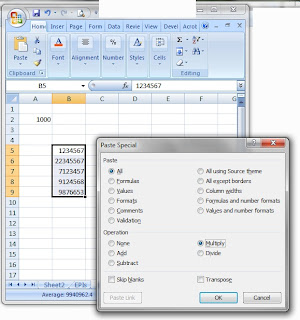
If you have a column of cells that need to be divided by 1000 for example. Here are the steps that you need to follow.
- Type 1000 in a cell lets say A2
- Copy the cell A2 using Ctrl+C
- Select the cells in the column where you would like to let us say multiply the values by 1000.
- Right click and select Paste Special
- Click on Multiply as shown below.

You can do the same for adding or subtracting a specific value from a group of cells.
This tip is particularly useful if you want to show the data that is in millions but want to reduce the number of digits by dividing them by 1000.
Hope this heps.
Tuesday, October 11, 2011
Increasing the number of recent files in SSMS
In Sql Server Management Studio, I usually access my sql query files that I save -- using the File -- Recent Files option. The default setting of the number of recent files to be displayed in SSMS. Today I wanted to access a file that I had used last week and I could not find that file in the recent list.
So I thought of displaying more than the normal 4 files that are displayed in the Recent Files option. So I set out to find where the settings are (as in the microsoft office programs) -- I clicked on Tools -- Options -- General -- The option reads as
Display 4 files in the recently used list. I changed the number 4 to 10.
Now it is starting to display 10 recently used files.
So I thought of displaying more than the normal 4 files that are displayed in the Recent Files option. So I set out to find where the settings are (as in the microsoft office programs) -- I clicked on Tools -- Options -- General -- The option reads as
Display 4 files in the recently used list. I changed the number 4 to 10.
Now it is starting to display 10 recently used files.
Friday, October 07, 2011
Export directory list in excel
- Yesterday I wanted to export the contents of a folder into excel to provide it to the users for input.
Here are the steps I followed. - Go to Start -- Run -- CMD
- Change to the drive letter of the drive in which the folder you want the contents listed is if you are not already there by typing the drive letter followed by a colon. Eg: d: for going to the d drive.
- Change to the folder of which you want the contents to be exported by using the chane directory command cd. Eg: cd shared/test for changing into the a directory called test which in turn is in the shared direcotry on the d drive.
- Then list the directories using the dir/d comman. This gives the list.
- Right click and click on MAark and select the contents you want to copy.
- After selecting right click again.
- Then paste this into a new excel document.
- Your list of directories is ready.
Wednesday, September 14, 2011
Save SQL Query results into another SQL database
Today I had a requirement to save the results of an SQL query into a sql table. Usually it is easy to export to excel by using the option of copying the results and pasting them to an excel file.
But this time I had over a million rows and I didnot want to use excel to store that huge amount of data. So I followed the following 2 simple steps.
1. Create a new table in a new database:
Use the SSMS to create the database and use the create table query to create the new table as follows:
create table databasename.dbo.tablename
([col1] [varchar(20)], [col2] [int], [col3] [datetime])
2. Create a SQL query using the Insert into command as follows:
Insert into databasename.dbo.tablename
(col1, col2, col3)
select a.col1, b.col2, c.col3 from tab1 a, tab2 b, tab3 c
where a.col1=b.col1 and b.col2=c.col3 and col1='zzz'
This query has inserted data into the new table directly.
But this time I had over a million rows and I didnot want to use excel to store that huge amount of data. So I followed the following 2 simple steps.
1. Create a new table in a new database:
Use the SSMS to create the database and use the create table query to create the new table as follows:
create table databasename.dbo.tablename
([col1] [varchar(20)], [col2] [int], [col3] [datetime])
2. Create a SQL query using the Insert into command as follows:
Insert into databasename.dbo.tablename
(col1, col2, col3)
select a.col1, b.col2, c.col3 from tab1 a, tab2 b, tab3 c
where a.col1=b.col1 and b.col2=c.col3 and col1='zzz'
This query has inserted data into the new table directly.
Thursday, September 08, 2011
Add months to date in excell
Yesterday I had this requirement to add number of months (m) to a cell that contains start date to estimate the end date. In 2003 I had to use a complex formula like below where A1 is the cell that contians the start date.
=DATE(YEAR(A1),MONTH(A1)+m,DAY(A1))
Well in Excel 2007 it is even more easy to add months with the Edate function like below.
=Edate(A1, m).
=DATE(YEAR(A1),MONTH(A1)+m,DAY(A1))
Well in Excel 2007 it is even more easy to add months with the Edate function like below.
=Edate(A1, m).
Tuesday, August 30, 2011
Using the script task in Management Studio
Today I was taking a back of a database and for the past two days this has become my regular activity. So I thought there should be some kind of recording option (like recording a macro in excel) so that I can just use the recorded action whenever I need to do the same task again and again.
So I tried to investigate and found this script button. So I thought I would investigate this. The following are the steps I followed to backup a database in the Management Studio.

So I tried to investigate and found this script button. So I thought I would investigate this. The following are the steps I followed to backup a database in the Management Studio.
- Right click the database that needs to be backed up.
- Click on Task -- Backup
- Choose the Backup options like how you choose normally.
- Before clicking Ok click on the Script option at the top and choose the option that you want from the 4 options available as shown below.

This has generated a nice script as shown below.
BACKUP
DATABASE [TEST] TO
DISK
= N'C:\Program Files\Microsoft SQL Server\MSSQL.1\MSSQL\Backup\TEST20110830.bak' WITH FORMAT, INIT, MEDIANAME = N'TEST', NAME = N'TEST-Full Database Backup', SKIP, NOREWIND, NOUNLOAD, STATS = 10
GO
This script can be used to do the same task again and again and also may be you can schedule this to be processed at a certain time every day.
Tuesday, August 23, 2011
Windows Firewall Settings on Windows 7
Today I had to access the Windows Firewall to check for blocking of a port. I am used to the command wscui.cpl from the Start -- Run screen of the Windows XP operating system. So I did the same thing on my Windows 7 screen. I was surprised to get the security centre where the Windows Firewall was not visible as shown below.

Luckily I saw the Control Panel Home link at the top and clicked on the link. Then I noticed the Windows Firewall as being a separate entity in the control Paenl and accessed this from there.

Luckily I saw the Control Panel Home link at the top and clicked on the link. Then I noticed the Windows Firewall as being a separate entity in the control Paenl and accessed this from there.
Friday, August 05, 2011
24 HOP -- September 7-8 2011
The registration for the much awaited 24 hours of PASS is now open. Here is an excerpt from the site.
Two Days of Free SQL Server Training!
Don't miss the best 24 hours of free, online SQL Server training in the industry with 24 Hours of PASS: Summit Preview September 7 and 8.
Join us for an exceptional lineup of SQL Server and BI experts, who will be presenting a sneak peek of their PASS Summit 2011 session topics in 24 live webcasts delivered directly to your computer.
Register here to attend these sessions.
Two Days of Free SQL Server Training!
Don't miss the best 24 hours of free, online SQL Server training in the industry with 24 Hours of PASS: Summit Preview September 7 and 8.
Join us for an exceptional lineup of SQL Server and BI experts, who will be presenting a sneak peek of their PASS Summit 2011 session topics in 24 live webcasts delivered directly to your computer.
Register here to attend these sessions.
Thursday, August 04, 2011
Powershell for SQL Server : An Introduction -- Free webinar
A free webinar is being organised by Idera on Powershell for SQL Server.
Here is an excerpt from the site.
In this session, Microsoft MVP Aaron Nelson will discuss what PowerShell is and demonstrate how and why DBAs should use it. Aaron will step you through the basics of Windows PowerShell and provide you with some commonly used first scripts to help you get started. Register for the webcast today!
The date and time of this webinar is below:
Wednesday, August 10, 2011
2:00 PM - 3:00 PM CST
Here is an excerpt from the site.
In this session, Microsoft MVP Aaron Nelson will discuss what PowerShell is and demonstrate how and why DBAs should use it. Aaron will step you through the basics of Windows PowerShell and provide you with some commonly used first scripts to help you get started. Register for the webcast today!
The date and time of this webinar is below:
Wednesday, August 10, 2011
2:00 PM - 3:00 PM CST
Wednesday, August 03, 2011
What the password policy of sql server?
Yesterday I had a question in my mind as to what could be the sql server password policy. So I started hunting in the Help menu of the SSMS window. Here is how I found that.

- Click on Help from Sql Server Management Studio.
- Choose contents
- Then choose Security considerations for SQL Server
- Then choose the Password Policy as shown in the screenshot below.

Wednesday, July 27, 2011
Using Countif in Excel
I was using excel today and I wanted to count all the cells in a range only when there is a value greater than 2. So I started hunting for a funciton in excel and found the countif function.
Countif(range,criteria)
But when I started using it like this -- Countif(A1:A100,>2) it didn't work. It was coming up with an error.
So I tried Countif(A1:A100,">2"). This worked. So if we include the criteria in quotes then the formula worked.
I also noticed a sumif function that also works in a similar way. It populates the sum of all the cells in the range specified that satisfy the criteria given.
Countif(range,criteria)
But when I started using it like this -- Countif(A1:A100,>2) it didn't work. It was coming up with an error.
So I tried Countif(A1:A100,">2"). This worked. So if we include the criteria in quotes then the formula worked.
I also noticed a sumif function that also works in a similar way. It populates the sum of all the cells in the range specified that satisfy the criteria given.
Friday, July 22, 2011
Webinar-- Best Practices for Sharepoint 2010 upgrade
Shared Squared is running a webinar on 26th July 2011. The topic is -- " Best Practices for SharePoint 2010 Upgrade and Configuration"
Here is an excerpt from the site
The webinar will include various demonstrations and discuss:
•Who should upgrade, why & when
•How to assess existing SharePoint deployments and identify upgrade risks and opportunities
•Specific tasks that need to be done to prepare for SharePoint 2010
•How to identify and upgrade existing 2007 customizations
•Best Practices for supporting parallel environments, migration & preserving the investment in your existing SharePoint deployment
•Avoiding Upgrade & Migration Pitfalls
You can register here
Here is an excerpt from the site
The webinar will include various demonstrations and discuss:
•Who should upgrade, why & when
•How to assess existing SharePoint deployments and identify upgrade risks and opportunities
•Specific tasks that need to be done to prepare for SharePoint 2010
•How to identify and upgrade existing 2007 customizations
•Best Practices for supporting parallel environments, migration & preserving the investment in your existing SharePoint deployment
•Avoiding Upgrade & Migration Pitfalls
You can register here
Tuesday, July 19, 2011
Adventure Works for SQL Server Denali CTP3
I came across this link on Codeplex this morning which will be helpful for learing Denali
Here is an excerpt from the site
This release is dedicated to the Adventure Works sample databases and related samples that ship for Microsoft SQL Server code-named "Denali", Community Technical Preview 3 (CTP3). This release uses the AdventureWorks2008R2 and AdventureWorksDWDenali sample databases. They have been upgraded to the "Denali" CTP3 version.
The only change to AdventureWorks2008R2 is the removal of the FILESTREAM dependency. The FILESTREAM properties have been removed from the Production.Document table. No additional schema or data changes have been made.
The only changes to AdventureWorksDWDenali are the additions of the FactProductInventory table, which contains inventory data, and more date data in the DimDate table to fill the years, 2001 to 2006.
These databases cannot be installed on any version of SQL Server other than SQL Server code-named "Denali" CTP3.
Here is an excerpt from the site
This release is dedicated to the Adventure Works sample databases and related samples that ship for Microsoft SQL Server code-named "Denali", Community Technical Preview 3 (CTP3). This release uses the AdventureWorks2008R2 and AdventureWorksDWDenali sample databases. They have been upgraded to the "Denali" CTP3 version.
The only change to AdventureWorks2008R2 is the removal of the FILESTREAM dependency. The FILESTREAM properties have been removed from the Production.Document table. No additional schema or data changes have been made.
The only changes to AdventureWorksDWDenali are the additions of the FactProductInventory table, which contains inventory data, and more date data in the DimDate table to fill the years, 2001 to 2006.
These databases cannot be installed on any version of SQL Server other than SQL Server code-named "Denali" CTP3.
Thursday, July 14, 2011
Powerpoint presentation tips
Today I was sitting in a demo presentation and learned a few tips that my colleague Mark Crosby shared.
Did you know that in the slide show mode of the powerpoint presentation if you want to jump to a particular slide, you can just put in the slide number and enter and you can go straight into that slide without coming out of the presentation mode. He also added that if you have the slides printed and numbered it will be easy for you to go to the respective slide if you know the number of the slide.
Another tip he shared is by pressing the 'B' key you can pause the presentation so that the audience concentrate on you rather than on the presentation. The screen turns black. You can resume the presentation by pressing the same 'B' key.
Pressing the 'W' key will make the screen white instead of black and resuming the presentation can be done by pressing the 'W' key again.
I thought these tips will be helpful for all you presenters out there....
Did you know that in the slide show mode of the powerpoint presentation if you want to jump to a particular slide, you can just put in the slide number and enter and you can go straight into that slide without coming out of the presentation mode. He also added that if you have the slides printed and numbered it will be easy for you to go to the respective slide if you know the number of the slide.
Another tip he shared is by pressing the 'B' key you can pause the presentation so that the audience concentrate on you rather than on the presentation. The screen turns black. You can resume the presentation by pressing the same 'B' key.
Pressing the 'W' key will make the screen white instead of black and resuming the presentation can be done by pressing the 'W' key again.
I thought these tips will be helpful for all you presenters out there....
Free TSQL Webcasts Start Next Week
In SSWUG.ORG’s “Writing T-SQL Queries and Code” webcast series, you will be able to learn how to write aggregate and crosstab queries, as well as how to use common table expressions to write recursive queries.
In three, in-depth sessions, Kathi Kellenberger, SQL Server Technology Specialist for Microsoft and author of Beginning T-SQL 2008, will teach beginning and experienced T-SQL programmers about writing code to ensure their applications are highly performing.
By the end of the series, you will be more familiar with T-SQL queries and know how to simplify your work through new and advanced features.
Learn more about the virtual webcast content and register today.
In SSWUG.ORG’s “Writing T-SQL Queries and Code” webcast series, you will be able to learn how to write aggregate and crosstab queries, as well as how to use common table expressions to write recursive queries.
In three, in-depth sessions, Kathi Kellenberger, SQL Server Technology Specialist for Microsoft and author of Beginning T-SQL 2008, will teach beginning and experienced T-SQL programmers about writing code to ensure their applications are highly performing.
By the end of the series, you will be more familiar with T-SQL queries and know how to simplify your work through new and advanced features.
Learn more about the virtual webcast content and register today.
Subscribe to:
Posts (Atom)
-
40 spectacular paper designs (using amazing colors & concepts) that need to look good and be informative in order to focus users’ attent...
-
 Did you know that you can connect to your Power BI Desktop Model from Sql Server Management Studio (SSMS)? If not, this blog post is fo...
 -
 From the past 3 days I have been working on resolving merged and hidden cells issues when an SSRS reports is exported to excel. ...