Yesterday I stumbled across this site while looking for something else. I couldn't find who the author is for this peice of work.
This page contains a very comprehensive list of resources for SQL server developers and DBAs. Here is a snapshot of the table of contents from thsi site.
Table of Contents
Training: Labs
Training: Podcasts
Training: Tutorials
Training: Videos
Training: Webcasts
Training: Whitepapers
General Skills
Skills: SQL
Skills: Windows Scripting
SQL Server
SQL Server 2008 R2
SQL 2008 R2: Virtualization
SQL Server 2008
SQL 2008: Administration
SQL 2008: Analysis Services (SSAS)
SQL 2008: Data Mining
SQL 2008: Filestream
SQL 2008: High Availability
SQL 2008: Integration Services (SSIS)
SQL 2008: Performance
SQL 2008: Reporting Services (SSRS)
SQL 2008: Power Shell
SQL 2008: XML
SQL Server 2005
SQL 2005: Administration
SQL 2005: Analysis Services (SSAS)
SQL 2005: Data Mining
SQL 2005: High Availability
SQL 2005: Failover - Cluster
SQL 2005: Integration Services (SSIS)
SQL 2005: Integration Services (SSIS) Migration
SQL 2005: Performance
SQL 2005: Reporting Services (SSRS)
SQL 2005: Windows Scripts
Virtual Server
Thursday, September 30, 2010


Wednesday, September 29, 2010
SQL Share a very useful video resource -- some positive changes that are helpful
For those of you who don't know about SQL Share here is a snippet from thei About Us page.
SQLShare is a division of Fourdeuce Inc, an Orlando, FL based company that also owns End to End Training, a well known provider of technical training. Fourdeuce is owned by Andy Warren, Brian Knight, and Steve Jones.
I have been getting daily emails from SQL Share since my subscription in April 2010. I used to watch some of the videos. These are small videos that cover various aspects of SQL SERVER by various authors. This is a very good resource for beginners and sometimes helps professionals as well. Everybody will learn something from here. There is no doubt about it.
But getting the email today made a difference compelling me to watch it as soon as I saw the email.
The reason for it is below. Have a look at the image below.

I just couldn't click on "Watch it Later" because I wanted to see because it is written in bold writing clearly that it is going to take only 3 min.
If you don't click on the link after seeing the "Learn Something today in 3 min. 46 secs" which is a minute fraction of 24 hrs in a day then I must say that you are not commited to learning. I looked at the topic and thought "Let me see what I will learn in this which I do day in and day out" But I did learn two points which I have posted in my previous blog.
Andy in his email said that he is experimenting this week. I think this little change will influence a lot of peopl in their learning goals and also credit the author of each featured video who take lot of pains recording it to be useful for the community.
Thanks to Andy who is doing a good job of sending these innovative emails.
Another very important change that was done is when you finished watching the video automatically two multiple choice questions come up to test whether you were really concentrating on the video which I found really useful.
Added to this there is a link "challenge your friend" which I quite like that we can send to colleagues for them to answer if they can.
SQLShare is a division of Fourdeuce Inc, an Orlando, FL based company that also owns End to End Training, a well known provider of technical training. Fourdeuce is owned by Andy Warren, Brian Knight, and Steve Jones.
I have been getting daily emails from SQL Share since my subscription in April 2010. I used to watch some of the videos. These are small videos that cover various aspects of SQL SERVER by various authors. This is a very good resource for beginners and sometimes helps professionals as well. Everybody will learn something from here. There is no doubt about it.
But getting the email today made a difference compelling me to watch it as soon as I saw the email.
The reason for it is below. Have a look at the image below.

I just couldn't click on "Watch it Later" because I wanted to see because it is written in bold writing clearly that it is going to take only 3 min.
If you don't click on the link after seeing the "Learn Something today in 3 min. 46 secs" which is a minute fraction of 24 hrs in a day then I must say that you are not commited to learning. I looked at the topic and thought "Let me see what I will learn in this which I do day in and day out" But I did learn two points which I have posted in my previous blog.
Andy in his email said that he is experimenting this week. I think this little change will influence a lot of peopl in their learning goals and also credit the author of each featured video who take lot of pains recording it to be useful for the community.
Thanks to Andy who is doing a good job of sending these innovative emails.
Another very important change that was done is when you finished watching the video automatically two multiple choice questions come up to test whether you were really concentrating on the video which I found really useful.
Added to this there is a link "challenge your friend" which I quite like that we can send to colleagues for them to answer if they can.
Tuesday, September 28, 2010
Using Login Auditing in SQL SERVER by Brian Kelly
Today featured video in SQL Share was Brian Kelly's "Using Login Auditing in SQL SERVER". I watched this 3 min. video and learnt the following.
I know that we can view sql server error logs. I monitor them on a daily basis but I didnt know that the login audit requires a setup that is a bit similar to the normal windows event log set up. This can be set up when you right click on the sql server connection in the management studio and choose properties and then choose Security. There is n option to choose Failed logins only, Successful logins only and both failed and successful logins and of course the none option aswell.
These login auditing will not only appear in the sql server error logs but in the windows event logs as well.
The best part that we are getting as part of watching the sql share videos is testing the knowledge we have acquired immediately after the video finishes which I think is very innovative.
If you would like to watch the same video click on the link
I know that we can view sql server error logs. I monitor them on a daily basis but I didnt know that the login audit requires a setup that is a bit similar to the normal windows event log set up. This can be set up when you right click on the sql server connection in the management studio and choose properties and then choose Security. There is n option to choose Failed logins only, Successful logins only and both failed and successful logins and of course the none option aswell.
These login auditing will not only appear in the sql server error logs but in the windows event logs as well.
The best part that we are getting as part of watching the sql share videos is testing the knowledge we have acquired immediately after the video finishes which I think is very innovative.
If you would like to watch the same video click on the link
Saturday, September 18, 2010
What is Sargability?
I planned to attend Rob Farley's 24HOP session but could not make it. I didn't know what Sargability meant at the time and thought I will google it.
And here is what I have found out thanks to the internet.
Here is a blog post which gives the history of how the word came into existence back in 2005 where Brad McGhee explains that the sargability is a real word but it is used a lot in the SQL Server world.
So what exactly does Sargable mean?
SARG is a contraction for Search ARGument ABLE as mentioned in Rob Farley's article.
I am looking forward for the recording of this 24HOP session. Meanwhile you can have a look at the posting by Rob Farley in his blog where he gives links to the resources he has mentioned in his presentation.
And here is what I have found out thanks to the internet.
Here is a blog post which gives the history of how the word came into existence back in 2005 where Brad McGhee explains that the sargability is a real word but it is used a lot in the SQL Server world.
So what exactly does Sargable mean?
SARG is a contraction for Search ARGument ABLE as mentioned in Rob Farley's article.
I am looking forward for the recording of this 24HOP session. Meanwhile you can have a look at the posting by Rob Farley in his blog where he gives links to the resources he has mentioned in his presentation.
Friday, September 17, 2010
My takeaways from Adam Jorgensen's 24HOP session -- Zero to cube
Here are my takeaways from today's fantastic session of Adam
The Data Warehouse Toolkit: The Complete Guide to Dimensional Modeling
Microsoft SQL Server Product Samples: Database
- The first basic point was you can use "." instead of "localhost" to choose the localhost server.
- Defining the attribute relationship was very clearly explained that the relatiosnhps should be from the lowest level to the highest level.
- Proactive caching -- available in from SQL SERver 2008 but the refresh property is available in Excel 2007 but sometimes may not work properly.
The following two resources which are quite useful was also discussed.
The Data Warehouse Toolkit: The Complete Guide to Dimensional Modeling
Microsoft SQL Server Product Samples: Database
Friday, September 10, 2010
Free SQL Tools as blogged by
Today I stumbled across this very useful post by Mladen Prajdić
Click here to read more
As he says in the end ...
Even if none of this stuff helps you at the moment it's good to know they exist.
Because DBA-ing is like a box of chocolates, you never know what you're going to get :)
Click here to read more
As he says in the end ...
Even if none of this stuff helps you at the moment it's good to know they exist.
Because DBA-ing is like a box of chocolates, you never know what you're going to get :)
Thursday, September 02, 2010
What are plan guides?
Just a while ago I was watching a video on sqlshare Creating a Plan Guide for a Parameterized Statement By Andy Warren . Only then I heard about plan guides. I didn't know what plan guides were. Here is my find from googling
In SQL Server 2005, there is a new feature called Plan Guides that can help out in some cases where you discover poorly performing queries that you don't have direct control over. Essentially, a Plan Guide allows you to add or modify query hints to queries on the fly, just before they are executed. Click here for a detailed article on plan guides by Brad McGehee.
In SQL Server 2005, there is a new feature called Plan Guides that can help out in some cases where you discover poorly performing queries that you don't have direct control over. Essentially, a Plan Guide allows you to add or modify query hints to queries on the fly, just before they are executed. Click here for a detailed article on plan guides by Brad McGehee.
Monday, August 16, 2010
Count number of months between two dates in excel
The formula I used for this is
datediff(cell1,cell2,"m").
This will give you the number of months.
datediff(cell1,cell2,"m").
This will give you the number of months.
Monday, August 02, 2010
Automatically forward email messages to another user
Today I had a requirement to automatcially forward email messages to another user, since this user has left the organisation.
On my research, I have come up with this article which gives a detailed step by step instructiions
Click here to go to that article
On my research, I have come up with this article which gives a detailed step by step instructiions
Click here to go to that article
Friday, July 30, 2010
MMC cannot open -- in Citrix
Today I had a problem with our citrix server, where in the Management Console was not opening as usual when I try to open any of the below processes. Citrix Access Management console, Event Viewer, Manage Server, Administrative tools etc.
but I could access the event viewer from another machine. Here is what the event viewer error message says.

Here are the steps I have been advised to follow by Aaron Mountford (gen-i consultant) to resolve this.
I have registered the two dlls as follows.
Click Start, click Run, type regsvr32 Msxml3.dll, and then click OK
Click Start, click Run, type regsvr32 %systemroot%\system32\inetsrv\wamreg.dll, and then click OK.
but I could access the event viewer from another machine. Here is what the event viewer error message says.

Here are the steps I have been advised to follow by Aaron Mountford (gen-i consultant) to resolve this.
I have registered the two dlls as follows.
Click Start, click Run, type regsvr32 Msxml3.dll, and then click OK
Click Start, click Run, type regsvr32 %systemroot%\system32\inetsrv\wamreg.dll, and then click OK.
Thursday, July 29, 2010
Convert a date to show AM/PM in SQL
Today I was working on a date column -- create_date. I wanted to show whether the row was created in the morning or in the evening i.e., AM/PM
This is what I did to achieve this.
SELECT rn_create_date, SUBSTRING(CONVERT(varchar(20), Rn_create_date, 22), 18, 3) AS Expr1
FROM tablename;
Here is the link to the BIDN blog where I have posted
This is what I did to achieve this.
SELECT rn_create_date, SUBSTRING(CONVERT(varchar(20), Rn_create_date, 22), 18, 3) AS Expr1
FROM tablename;
Here is the link to the BIDN blog where I have posted
If we are used to the Query Analyser of SQL Server 2000, we might find it frustrating that the query window does not automatically come up when you start SSMS.
You have to either press Ctrl+N or Click on New Query to start it up.
Here is a way to start up the New Query window automatically.
Click on Tools-- Options click on the + to exapnd environment and click on General.
The following screen comes up.
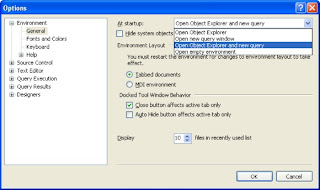
Click on the drop down beside start up and choose ' Open Object Exlpoer and New query'.
Click Ok. Next time when you open SSMS the query window will automatically be opened for you.
Here is link to the blog I posted in my BIDN blog.
You have to either press Ctrl+N or Click on New Query to start it up.
Here is a way to start up the New Query window automatically.
Click on Tools-- Options click on the + to exapnd environment and click on General.
The following screen comes up.

Click on the drop down beside start up and choose ' Open Object Exlpoer and New query'.
Click Ok. Next time when you open SSMS the query window will automatically be opened for you.
Here is link to the blog I posted in my BIDN blog.
Friday, July 23, 2010
Hiding your folders using command prompt
To hide your folders using the command prompt, click start -- run -- Type cmd and press enter
The commoan screen appear.
Do the following:
The commoan screen appear.
Do the following:
- To hide, d:/>attrib +h +s +r
- To revert d:/>attrib -h -s -r
The folder ill be still hidden even if you set 'show all hidden files' under folder view options
Make sure you keep a note of your fodler name otherwise you cannot unhide it.
Thursday, July 22, 2010
Star Schema vs. Snowflake Schema
Star Schema
• Start schema is simpler and hence good to use for small data warehouses. The rules that apply here are as follows:
• Each dimension is represented by a single dimension table
• Each dimensional table is related to or linked to a fact table.
• The relation is merely a master and detail relationship with Primary key being the dimension and reference key in the fact table.
• When there are 5 or more dimensions referring to one fact table it appears like a star and hence the name star schema
• In terms of ease of use you need less complex queries and easy to understand
• This design has redundant data and hence hard to maintain and change.
• Lesser query execution time due to lesser number of queries
Snowflake Schema
• Snowflake schema starts like a star schema and more complex and hence it is good to use the snow flake schema for large data warehouses. The rules that apply here are as follows:
• Each dimension is represented by a two or more dimension tables
• Each dimensional table is not directly related to fact table
• Here the tables that describe the dimensions are normalised.
• In terms of ease of use you have to use more complex queries
• There is no redundancy and easy to maintain and change
• More query execution time because of more foreign keys
• Start schema is simpler and hence good to use for small data warehouses. The rules that apply here are as follows:
• Each dimension is represented by a single dimension table
• Each dimensional table is related to or linked to a fact table.
• The relation is merely a master and detail relationship with Primary key being the dimension and reference key in the fact table.
• When there are 5 or more dimensions referring to one fact table it appears like a star and hence the name star schema
• In terms of ease of use you need less complex queries and easy to understand
• This design has redundant data and hence hard to maintain and change.
• Lesser query execution time due to lesser number of queries
Snowflake Schema
• Snowflake schema starts like a star schema and more complex and hence it is good to use the snow flake schema for large data warehouses. The rules that apply here are as follows:
• Each dimension is represented by a two or more dimension tables
• Each dimensional table is not directly related to fact table
• Here the tables that describe the dimensions are normalised.
• In terms of ease of use you have to use more complex queries
• There is no redundancy and easy to maintain and change
• More query execution time because of more foreign keys
Friday, July 16, 2010
Make movies online
Today I came across this site where you can make movies on the web. Here is the link.
You can start creating movies just by typing your text.
You can start creating movies just by typing your text.
Friday, June 25, 2010
Building a cube without a data source
Sometimes we might have to build a cube without a relational data source. In this scenario, we can build a cube without a datasource focusing on designing the dimensions and measures and then BIDS can generate the relational schema that is needed to populate the cube.
The following are the steps to achieve this.
•Start a new analysis Services Project in BIDS.
•In the Select method to build the cube diablog box -- choose "Build the cube without using a data source".
•In the Define New Measrue dialog box -- define the measures and measure groups.
•In the Define New Dimensions dialog box -- define the dimensions and set the basic properties
•In the Define Time Periods dialog box -- Define the first calendar day, last calendar day, first day of the week and the time periods whether it is year, quarter, month, date etc.
•Specify additional calendars if needed
•In the Define Dimension Usage dialog box -- Specify how the dimensions relate to the measure groups in the cube.
•In the completing the Wizard dialog box -- Enter the cube name and click Generate Schema now tickbox. This generates the schema geneeration wizard.
•In the Schema Generation Wizard dialog box -- Specify the Data Source view name and this will create the new Data Source View.
•In the Connection Manager dialog box -- Fill in the Provider, server name, Logon to the server, Connect to database fields.
•In the Impersonation Information dialog box -- Use the Service account (is recommended)
•In the data source wizard -- Specify the data source name
•In the Subject Area Database Schema Options dialog box -- Specify the options, accept the defaults
•In the Specify Naming Conventions dialog box -- just accept the defaults.
•After the above steps are completed, the data source view is generated in BIDS
•Populate the data source with data so that this data can be used to populate the cube.
•The last step is to right click the relevant cube in the solution explorer and select Process. Accept all the defaults and click Run. This step extracts data from the data source view and populates the cube.
The cube is now ready for viewing.
Here is a link to the original blog I posted on BIDN.
The following are the steps to achieve this.
•Start a new analysis Services Project in BIDS.
•In the Select method to build the cube diablog box -- choose "Build the cube without using a data source".
•In the Define New Measrue dialog box -- define the measures and measure groups.
•In the Define New Dimensions dialog box -- define the dimensions and set the basic properties
•In the Define Time Periods dialog box -- Define the first calendar day, last calendar day, first day of the week and the time periods whether it is year, quarter, month, date etc.
•Specify additional calendars if needed
•In the Define Dimension Usage dialog box -- Specify how the dimensions relate to the measure groups in the cube.
•In the completing the Wizard dialog box -- Enter the cube name and click Generate Schema now tickbox. This generates the schema geneeration wizard.
•In the Schema Generation Wizard dialog box -- Specify the Data Source view name and this will create the new Data Source View.
•In the Connection Manager dialog box -- Fill in the Provider, server name, Logon to the server, Connect to database fields.
•In the Impersonation Information dialog box -- Use the Service account (is recommended)
•In the data source wizard -- Specify the data source name
•In the Subject Area Database Schema Options dialog box -- Specify the options, accept the defaults
•In the Specify Naming Conventions dialog box -- just accept the defaults.
•After the above steps are completed, the data source view is generated in BIDS
•Populate the data source with data so that this data can be used to populate the cube.
•The last step is to right click the relevant cube in the solution explorer and select Process. Accept all the defaults and click Run. This step extracts data from the data source view and populates the cube.
The cube is now ready for viewing.
Here is a link to the original blog I posted on BIDN.
Wednesday, June 23, 2010
Silverlight Operating system
Here is a link I found today that is really interesting. It is a windows 7 operating system simulation. Have a look.
Friday, June 18, 2010
Microsoft LogParser
Today I was frustrated with the built in error log in SQL SERVER 2005 and did some research and found the following link to Microsoft LogParser that can be used to search the error logs.
http://www.microsoft.com/downloads/details.aspx?FamilyID=890cd06b-abf8-4c25-91b2-f8d975cf8c07&displaylang=en
Log parser is a powerful, versatile tool that provides universal query access to text-based data such as log files, XML files and CSV files, as well as key data sources on the Windows® operating system such as the Event Log, the Registry, the file system, and Active Directory®. The results of your query can be custom-formatted in text based output, or they can be persisted to more specialty targets like SQL, SYSLOG, or a chart.
I have found this very useful
A sample query to search in the error logs is as follows:
Logparser.exe "select top 100 substr(text,23,9) as ESource, substr(text,0,22) as EDate, substr(text,32) asEMessage from \\d:\databases\MSSQLTEST\LOG\ERRORLOG.* where EMessage like '%database \'master\'.%'" -i:textline
http://www.microsoft.com/downloads/details.aspx?FamilyID=890cd06b-abf8-4c25-91b2-f8d975cf8c07&displaylang=en
Log parser is a powerful, versatile tool that provides universal query access to text-based data such as log files, XML files and CSV files, as well as key data sources on the Windows® operating system such as the Event Log, the Registry, the file system, and Active Directory®. The results of your query can be custom-formatted in text based output, or they can be persisted to more specialty targets like SQL, SYSLOG, or a chart.
I have found this very useful
A sample query to search in the error logs is as follows:
Logparser.exe "select top 100 substr(text,23,9) as ESource, substr(text,0,22) as EDate, substr(text,32) asEMessage from \\d:\databases\MSSQLTEST\LOG\ERRORLOG.* where EMessage like '%database \'master\'.%'" -i:textline
Wednesday, June 16, 2010
24 Hours of PASS Recordings Ready for Viewing!
24 Hours of PASS Recordings Ready for Viewing!
24 Hours of PASS brought an exceptional lineup of SQL Server and BI experts from around the world in 24 back-to-back webcasts starting at 12:00 GMT (UTC) on May 19 and 20. Attendees got an in-depth look at the hottest SQL Server and BI topics, including - as part of the SQL Server 2008 R2 Community Launch - the new SQL Server 2008 R2, including business intelligence and data management innovations, and much more.
Check out the sessions again or for the first time and learn from the community's top SQL Server experts. You need to be a PASS member (it's FREE to join!) to view the recordings.
24 Hours of PASS brought an exceptional lineup of SQL Server and BI experts from around the world in 24 back-to-back webcasts starting at 12:00 GMT (UTC) on May 19 and 20. Attendees got an in-depth look at the hottest SQL Server and BI topics, including - as part of the SQL Server 2008 R2 Community Launch - the new SQL Server 2008 R2, including business intelligence and data management innovations, and much more.
Check out the sessions again or for the first time and learn from the community's top SQL Server experts. You need to be a PASS member (it's FREE to join!) to view the recordings.
Tuesday, June 15, 2010
SSIS Expression Tester
The expression tester tool is a standalone application that allows you to easily develop and test expressions. It is like a workbench to quickly try things without having to open a package or mess up the one your currently working on. It is designed to be easily portable, just extract the files and run, but it does require SQL Server Integration Services to be installed on the machine. The download contains both SQL Server 2005 and SQL Server 2008 versions of the tool and control.
You can download this tool at the following link
SSIS Expression Tester
You can download this tool at the following link
SSIS Expression Tester
Friday, June 04, 2010
Shortcut key to display Macro dialogue
In excel the shortcut key to display the macro dialog box is Alt+F8. This can then be used to create, run, edit, or delete a macro.
Thursday, June 03, 2010
Crystal reports not working from CRM system
today I had a problem where the crystal reports that render through the CRM system that print on a label printer were not printing. The error coming up was - "Error printing to crystal reports." Our system admin tried to reinstall the printer software, but that didnot fix the problem. Then I asked him to check whether it is the Microsoft updates.
Then he restarted the system and allowed the updates to go through and that fixed the problem.
Then he restarted the system and allowed the updates to go through and that fixed the problem.
Friday, May 14, 2010
I had a requirement to import an excel 2007 spreadsheet into a database as a table in sql server 2005. In Excel 2007 the drivers required for exporting have changed when compared to the previous versions. With Excel 2007 you use the driver named 'Microsoft Access 12.0 database engine OL DB provider'
Following are the steps to import data into sql server 2005 from Excel.
Following are the steps to import data into sql server 2005 from Excel.
- Right click on the database from sql server management studio and choose tasks -- import data
- Choose the data source as the driver name specified above ('Microsoft Access 12.0 database engine OL DB provider')
- Click on properties button and click on All tab
- Double click on the data source line and give the file name with the exact path in the property value field. Click ok
- Double click on the Extended properties line and enter Excel12.0 in the property value field. Click ok twice.
- Click next through the import wizard and preview the data and click finish.
Your data is imported into the sql server database.
Thursday, May 13, 2010
I have attended the idera sponsored webinar on 'Top 10 Most Useful SQL Server DMVs' by Greg Robidoux
Here are my learnings of that webcast
What are DMVs
Dynamic Management Views are views and functions introduced in sql server 2005 for monitoring and tuning sql server performance.
Dynamic Management Objects (DMOs)
Dynamic Management Views (DMVs) -- can select like a view
Dynamic Management Functions(DMFs) --Requires input parameters like a function
When and Why use them
Provides information that was not available in previous version of sql server
Provides a simpler way to query the data just like any other view versus using DBCC commands or system stored procedures
Types of DMVs
Here are my learnings of that webcast
What are DMVs
Dynamic Management Views are views and functions introduced in sql server 2005 for monitoring and tuning sql server performance.
Dynamic Management Objects (DMOs)
Dynamic Management Views (DMVs) -- can select like a view
Dynamic Management Functions(DMFs) --Requires input parameters like a function
When and Why use them
Provides information that was not available in previous version of sql server
Provides a simpler way to query the data just like any other view versus using DBCC commands or system stored procedures
Types of DMVs
- change data capture
- common language runtime
- database mirroring
- database
- execution
- full-text search
- I/O
- Index
- Object
- Query notifications
- Replication
- Resource governor
- SQL Operating System
Get a list of all DMOs
select name, type_descfrom sys.all_objects where name like 'dm%' order by name
Permissions
Server scoped-- view server state
Database scoped--view database state
Deny takes prescedencedeny state or deny select on an object
People should have sys admin privileges
Grant permissions
grant view server state to loginname
grant view database state to user
deny view server state to loginname
deny view database state
must create user in master first
Specific types of DMVs
- database
- execution
- IO
- Index
- SQL operatng system
Database for page and row count
select object_name(object_id) as objname, * from sys.dm_db_partition_stats order by 1
Tips 1851 -- mssqltips.com
Execution--- (when sql server is restart everything is reset)
sys.dm_exec_sessions-- info about all active user connections and internal tasks
sys.dm_exec_connections-- info about connections established
sys.dm_exec_requests-- info about each request that is executing (including all system processes)
Tips 1811, 1817, 1829, 1861
Execution--- Query plans
sys.dm_exec_sql_text--returns text of sql batch
sys.dm_exec_query_plan--returns showplan in xml
select * from sys.dm_exec_query_stats-- returns stats for cached query plans sys.dm_exec_cached_plans--each query plan that is cached
Exection -- example
select * from dm_exec_connections cross apply
sys.dm_exec_sql_text(most_recent_sql_handle)
select * from dm_exec_requests cross apply
sys.dm_exec_sql_text(sql_handle)
Select T.[text],p.[query_plan], s.[program_name],s.host_name, s.client_interface_name, s.login_name, r.* from sys_dm_exec_requests r inner join sys.dm_exec_sessions S ONs.session_id = r.session_idcross apply sql_text cross apply sys.dm_execsql_query_plan
select usecounts, cacheobjype, objtype, text from sys.dm_exec_cached_planscross apply dm_exec_sql_text(plan_handle)where usecounts > 1 order by use counts desc
IO
select * sys.dm_io_pending_io_requests can be run when you think that io can be a bottleneck select * from sys.dm_io_virtual_file_stats (null,null)
select db_name(database_id), * from sys.dm_io_virtual_file_stats(null,null) --shows io stats for data and log files -- database id and
file id -- null returns all datadb_name is a funtion to return the name of the actual
database rather than database id
Index (when sql server is restart everything is reset)
sys.dm_dm_db_index_operational_stats (DMF) -- shows io, locking and access information such as inserts, deletes, updates
sys.dm_dm_db_index_physical_stats (DMF) -- shows index storage and fragmaentation info,
sys.dm_dm_db_index_usage_stats (DMV) -- shows how often indexes are used and for what type of SQL operation
Tips 1239, 1545, 1642, 1749, 1766, 1789
Index examples
select db_name(dtabase_id), object_name(), * from operation_stats(5,null,null,null)
parameters databaseid, objectid, indexid, partition number
select db_name(dtabase_id), object_name(), * from physical_stats(DB_ID(N'Northwind'),5,null,null,null, detailed)
parameters databaseid, objectid, indexid, partition number, mode
Missing indexes
- sys.dm_db_missing_index_details
- sys.dm_db_missing_index_groups
- sys.dm_db_missing_index_group_stats
- sys.dm_db_missing_index_columns
Tip 1634
SQL Operating system
sys.dm_os_schedulers-- information abt processors
sys.dm_os_sys_info-- info abt computer and abt resources available to and consumed by sql server
sys.dm_os_sys_memory-- how memory is used overall on the server, and how much memory is available.
sys.dm_os_wait_stats-- info abt all waitsDBCC SQLPERF('sys.dm_os_wait_stats', CLEAR)
Tips 1949
sys.dm_os_buffer_descriptors-- info abt all data pages that are currently in the sql server buffer pool
Tips 1181, 1187
memory use by database
memory use by table
Monday, May 10, 2010
SSAS does not work if copied from another machine as a VM -- Why?
Did you know that even if you create an exact copy of the sql server virtual machine, the analysis services will not work?
I faced this problem last week.
The exisitng development machine (lets call it DEV1) stopped working and was giving lots of errrors.
So we thought that we will create a copy of the exisitng production system as a virtual machine and use that as the development machine and we created an exact copy of the production system as a virtual machine but gave it a different name (DEV2).
Then decomissioned the original development machine.
When I tried to access the sql server database on the new development machine (DEV2) the access was fine. But when I tried to access the analysis services through the management console, there was no response.
So I thought I had two options to make analysis services to work --
Since option 2 was easier I thought I would try that first. And bingo the trick worked.
But I still don't know why analysis services does not work from a copy.
Can anyone of you help me understand why?
I faced this problem last week.
The exisitng development machine (lets call it DEV1) stopped working and was giving lots of errrors.
So we thought that we will create a copy of the exisitng production system as a virtual machine and use that as the development machine and we created an exact copy of the production system as a virtual machine but gave it a different name (DEV2).
Then decomissioned the original development machine.
When I tried to access the sql server database on the new development machine (DEV2) the access was fine. But when I tried to access the analysis services through the management console, there was no response.
So I thought I had two options to make analysis services to work --
- Option 1: Reload sql server from scratch and ssas and SSRS and then copy all databases and cubes from the production server.
- Option 2: Try renaming the new development machine (Dev2) to the old development machine (Dev1)
Since option 2 was easier I thought I would try that first. And bingo the trick worked.
But I still don't know why analysis services does not work from a copy.
Can anyone of you help me understand why?
Thursday, May 06, 2010
PASS Hosts New Com.PASS Content Feeds
PASS is pleased to host Com.PASS, a new set of content feeds that provide Microsoft SQL Server and Business Intelligence professionals broad access to quality information across respected community Websites.
Conceived by Brian Knight of Pragmatic Works and developed in collaboration with PASS President Rushabh Mehta, SQLServerCentral.com Editor Steve Jones, and sswug.org Founder and Managing Editor Stephen Wynkoop, Com.PASS employs a SQL Server Integration Services (SSIS) package that uses keywords to scrub selected community Websites for relevant content.
“Com.PASS is about making it faster and easier for busy SQL Server pros to find the information they need to do their jobs better,” notes PASS’s Mehta. “You can quickly get lost in the sea of links and information available on the Web. Com.PASS feeds you content in your target topic areas from sites that you can trust.”
Initially focusing on BI content, Com.PASS currently includes five feeds:
§ Com.PASS.BI, for BI content across the Microsoft SQL Server and Office stacks
§ Com.PASS.SSAS, for SQL Server Analysis Services content
§ Com.PASS.SSIS, for SQL Server Integration Services content
§ Com.PASS.SSRS, for SQL Server Reporting Services content
§ Com.PASS, which combines all the feeds Just click a feed to add it to your RSS reader.
Learn more and subscribe to your favorite feeds.
PASS is pleased to host Com.PASS, a new set of content feeds that provide Microsoft SQL Server and Business Intelligence professionals broad access to quality information across respected community Websites.
Conceived by Brian Knight of Pragmatic Works and developed in collaboration with PASS President Rushabh Mehta, SQLServerCentral.com Editor Steve Jones, and sswug.org Founder and Managing Editor Stephen Wynkoop, Com.PASS employs a SQL Server Integration Services (SSIS) package that uses keywords to scrub selected community Websites for relevant content.
“Com.PASS is about making it faster and easier for busy SQL Server pros to find the information they need to do their jobs better,” notes PASS’s Mehta. “You can quickly get lost in the sea of links and information available on the Web. Com.PASS feeds you content in your target topic areas from sites that you can trust.”
Initially focusing on BI content, Com.PASS currently includes five feeds:
§ Com.PASS.BI, for BI content across the Microsoft SQL Server and Office stacks
§ Com.PASS.SSAS, for SQL Server Analysis Services content
§ Com.PASS.SSIS, for SQL Server Integration Services content
§ Com.PASS.SSRS, for SQL Server Reporting Services content
§ Com.PASS, which combines all the feeds Just click a feed to add it to your RSS reader.
Learn more and subscribe to your favorite feeds.
Wednesday, May 05, 2010
Exceptional DBA Awards -- Get nominated or nominate people you know
Nominations for The Exceptional DBA of 2010 open today, giving database administrators around the world the chance to be recognized for service to their employers, the SQL Server community, and the IT industry at large.
The link to the site is:
http://www.exceptionaldba.com/?utm_source=ssc&utm_medium=survey&utm_content=dba_awards&utm_campaign=sqlbackupbundle
Secure and available data is crucial for a company's success, and so are the DBAs. All too often DBAs don't get the respect they deserve.
And if you agree with us that it's time to change this, then please help us find 2010's Exceptional DBA Awards winner!
"If you are an exceptional DBA, or know of an exceptional DBA, I encourage you to participate in the Exceptional DBA Awards. Not only will it give you or some exceptional DBA some much-deserved recognition, it will also help to increase the awareness of the importance of the DBA role among the IT community."
Brad McGehee, Exceptional DBA Awards Judge
Would you like to nominate yourself or a DBA you know? Nominations are now open, and we are waiting for your entry! Please make sure that all details have been submitted before June 4, 2010.
Free resources for exceptional DBAs
===========================
The awards sponsor, Red Gate Software, is offering you Brad McGehee's "Day-to-Day DBA Best Practices" poster and a free trial of the SQL Backup Bundle – all Red Gate's DBA tools in a single suite. Red Gate's SQL Backup Bundle includes products such as SQL Backup, to compress, encrypt and strengthen backups, and SQL Response, to monitor SQL Server health and activity. Download free resources now.
The link to the site is:
http://www.exceptionaldba.com/?utm_source=ssc&utm_medium=survey&utm_content=dba_awards&utm_campaign=sqlbackupbundle
Secure and available data is crucial for a company's success, and so are the DBAs. All too often DBAs don't get the respect they deserve.
And if you agree with us that it's time to change this, then please help us find 2010's Exceptional DBA Awards winner!
"If you are an exceptional DBA, or know of an exceptional DBA, I encourage you to participate in the Exceptional DBA Awards. Not only will it give you or some exceptional DBA some much-deserved recognition, it will also help to increase the awareness of the importance of the DBA role among the IT community."
Brad McGehee, Exceptional DBA Awards Judge
Would you like to nominate yourself or a DBA you know? Nominations are now open, and we are waiting for your entry! Please make sure that all details have been submitted before June 4, 2010.
Free resources for exceptional DBAs
===========================
The awards sponsor, Red Gate Software, is offering you Brad McGehee's "Day-to-Day DBA Best Practices" poster and a free trial of the SQL Backup Bundle – all Red Gate's DBA tools in a single suite. Red Gate's SQL Backup Bundle includes products such as SQL Backup, to compress, encrypt and strengthen backups, and SQL Response, to monitor SQL Server health and activity. Download free resources now.
Saturday, May 01, 2010
XSLT, XML tools
Here are two free tools for working with XSLT, XQuery and XPath.
XRay is a free XML editing enviroment. Now in its second major release, XRay provides support for XML Schema (XSD) and an integrated online XML tutorial system.
XRay is free. Download it right away!.
Kernow is an open source tool designed to make it faster and easier to repeatedly run transforms using Saxon.
It uses compiled stylesheets, multiple threads and caching resolvers to make the transforms run efficiently, and comboboxes that remember between runs to save your fingers having to retype paths. Kernow is runnable from Ant allowing it to slot into your build process, and its a high level API for Saxon making it very easy to run transforms from your own Java applications.
Kernow is written by Andrew Welch using Java 1.6.
XRay is a free XML editing enviroment. Now in its second major release, XRay provides support for XML Schema (XSD) and an integrated online XML tutorial system.
XRay is free. Download it right away!.
Kernow is an open source tool designed to make it faster and easier to repeatedly run transforms using Saxon.
It uses compiled stylesheets, multiple threads and caching resolvers to make the transforms run efficiently, and comboboxes that remember between runs to save your fingers having to retype paths. Kernow is runnable from Ant allowing it to slot into your build process, and its a high level API for Saxon making it very easy to run transforms from your own Java applications.
Kernow is written by Andrew Welch using Java 1.6.
Wednesday, April 28, 2010
SSIS session in Auckland by Patrick
We had a really interesting session with Patrick of Pragmatic Works yesterday on the topic "Introduction to SSIS".
He has covered the following basic aspects of SSIS
Here are my takeways from this session
Tip 1
You can use -NOSPLASH in the shortcut of the Visual studio icon to avoid the initial start up screen when you open Visual Studio
Tip 2
He has covered the following basic aspects of SSIS
- Opening BIDS environment with a -NOSPLASH
- Creating a small package with some package requirements -- Control flow, Data flow, Event Handler, package explorer
- Deplying the created package
- Scheduling a package
Here are my takeways from this session
Tip 1
You can use -NOSPLASH in the shortcut of the Visual studio icon to avoid the initial start up screen when you open Visual Studio
Tip 2
Data Connections can be created in two ways --
- Via the Data Source on the right hand side of the screen of the solution. If the data source is created this way, it can be used by all the packages in the project.
- Via the connection manager within the package itself. If this is used, the connections can be used only within that package.
Tip 3
Data Flow Taks can be created in two ways
- Via the Control flow tab -- by dragging the Data flow task from the toolbox
- Via the Data Flow Tab -- by just clikcing on the link available in this tab.
Tip 4
Always use OLEDB source instead of ADO.NET source for greater performance
Tip 5
In the OLEDB source tool always use SQL command instead of Table/view. Using the Table/View can slow down the SSIS package considerably.
Tip 6
When sql command in used, use the Preview button instead of the Parse Query button
Tip 7
You can use look up task and derived column task to redirect the un match rows to an error output.
Tip 8
If you use the row count task in the data flow tab that creates an unnamed variable, to name this varaible right click on the grey space on the control flow tab and name the variable.
Tip 9
You can right click on the control flow tab and click on the Package Configurations to configure the package. These configurations can be created as an XML file which can then be modified at deployment.
Tip 10
When you build a project and deploy, the package will be in the MSDB database of the sql server.
Tip 11
You can schedule an SSIS package using the SQL SERVER Agent or using dt exec command line.
Thursday, April 22, 2010
Highlights of Visual Studio 2010 and Windows Azure Launch event
Today I have attended the Visual Studio 2010 and Windows Azure Launch event in Auckland. There were close to 1000 people for this event.
The first presentation on Visual Studio was done by Sam Guckenheimer. He took us through the Visual Studio product suite
The first presentation on Visual Studio was done by Sam Guckenheimer. He took us through the Visual Studio product suite
- He explained how this product can now reduce time wastage in the SDLC,
- also how transparent the VS has become in terms of managing a project from a team perspective (using excel and sharepoint to monitor the team progress on a project)
- how the use of layer diagrams helps communicate the design intent and later helps check the implementation against the design.
The second presentation was done by David Chappell on Windows Azure platform which is the Microsoft Cloud Computing Technology.
He said that there are two broad categories for cloud computing -- Cloud Applications and Cloud Platform.
He covered on the cloud platform of Windows Azure. Windows Azure is a platform where you ask for an application to run (instead of a VM) and the application will control how many VMs to run etc. The Windows Azure platform recognises if an instance failed and restarts a new instance automatically.
He also mentioned about the SQL Azure which is basically Sql server and this needs the TDS (Tabular Data Stream) protocol
Also talked about the applications of Azure as follows:
- Apps that need massive scale
- Apps that need high reliability
- Apps with variable load
- Apps with a short or unpredictable lifetime
- Apps that do parallel processing
- Apps that must fail fast or scale fast
- Apps that don't fit well in an organisation's data centre
- Apps that can benefit from external storage
He also mentioend the differences between the various cloud platforms (Amazon web services, Google App Engine, Force.com) and whether they are competitors or not.
Tuesday, April 13, 2010
Tools for collecting SQL Server instances
Due to the proliferation of personal firewalls, inconsistent network library configurations, and multiple-instance support, SQL Server installations are becoming increasingly difficult to discover, assess, and maintain.
Peter Ward from WardyIT Solutions while presenting in the SQL Saturday event at Auckland last weekend has asked all of us the following question:
“Do you know how many instances are there in your network?”
Only two people in the entire room have raised their hands.
He mentioned about the following tools being available for collecting sql server instances in a network.
Sqlping from www.sqlsecurity.com
SQLPing 3.0 is a free tool available which performs both active and passive scans of your network in order to identify all of the SQL Server/MSDE installations in your enterprise.
SQLPing 3.0 is designed to remedy this problem by combining all known means of SQL Server/MSDE discovery into a single tool which can be used to ferret-out servers you never knew existed on your network so you can properly secure them. .NET Framework v2.0 Required.
You can find more information about SQLPING here
Microsoft assessment and planning toolkit (MAP Toolkit)
MAP Toolkit is a free tool from Microsoft that does a lot more than just scanning the network and identifying all instances of SQL Servers. Some of the features are outlined below.
For more information please click here
SQLIO
In the presentation Peter also briefly mentioned about SQLIO as a tool to measure SAN performance. I have googled for SQLIO and came up with the following.
SQLIO is a free utility from Microsoft that measures storage IO performance. The name "SQLIO" is horribly misleading, because it doesn't really have anything to do with SQL Server. There is a lot of information about SQLIO in the SQLServerpedia website
There may be lot of other tools out there. Please suggest me other tools if you can
Peter Ward from WardyIT Solutions while presenting in the SQL Saturday event at Auckland last weekend has asked all of us the following question:
“Do you know how many instances are there in your network?”
Only two people in the entire room have raised their hands.
He mentioned about the following tools being available for collecting sql server instances in a network.
Sqlping from www.sqlsecurity.com
SQLPing 3.0 is a free tool available which performs both active and passive scans of your network in order to identify all of the SQL Server/MSDE installations in your enterprise.
SQLPing 3.0 is designed to remedy this problem by combining all known means of SQL Server/MSDE discovery into a single tool which can be used to ferret-out servers you never knew existed on your network so you can properly secure them. .NET Framework v2.0 Required.
You can find more information about SQLPING here
Microsoft assessment and planning toolkit (MAP Toolkit)
MAP Toolkit is a free tool from Microsoft that does a lot more than just scanning the network and identifying all instances of SQL Servers. Some of the features are outlined below.
- Secure, Agentless Discovery and Inventory
- Generate Automated, Network-wide Readiness Assessments
- Quickly Create Reports and Proposals
- Capitalise on Cross-Sell and Up-Sell Opportunities
- Shorten Your Presales Cycle, Increase Your Opportunities
- Accelerate Server and PC Migration Planning
- Leverage Virtualisation to Help Reduce Customers' Costs
For more information please click here
SQLIO
In the presentation Peter also briefly mentioned about SQLIO as a tool to measure SAN performance. I have googled for SQLIO and came up with the following.
SQLIO is a free utility from Microsoft that measures storage IO performance. The name "SQLIO" is horribly misleading, because it doesn't really have anything to do with SQL Server. There is a lot of information about SQLIO in the SQLServerpedia website
There may be lot of other tools out there. Please suggest me other tools if you can
Monday, April 12, 2010
SQL Server 2008 R2 Training Kit
SQL Server 2008 R2 Training Kit
New updated version of SQL Server 2008 R2 Training Kit is available for download from the microsoft site.
This has some hands on labs, tutorials, presentations, and videos.
Download from:http://www.microsoft.com/downloads/details.aspx?displaylang=en&FamilyID=fffaad6a-0153-4d41-b289-a3ed1d637c0d
Hope you will enjoy using this training kit.
Sunday, April 11, 2010
Recap from SQL Saturday Auckland event -- 10th April 2010
This past weekend I have attended the SQL Saturday event in Auckland.
The turnout for this event was really good with close to 100 people attending including the organizers and presenters. Thanks to everyone that helped out to put on a very successful event.
Here is a list of the presenters and the topics presented. We had to cancel the main organizer’s (Dave Dustin) due to lack of time.
The lunch was Pizzas and subway sandwiches which was delicious. We also had an afternoon tea of Giapo Gelato Ice cream.
During every session there were various prizes for the people who were asking questions and also at the end there were some prizes from the sponsors.
I will try to blog on each presentation in detail a bit later.
The turnout for this event was really good with close to 100 people attending including the organizers and presenters. Thanks to everyone that helped out to put on a very successful event.
Here is a list of the presenters and the topics presented. We had to cancel the main organizer’s (Dave Dustin) due to lack of time.
| Session Title | My learning’s in brief |
| Analysis Services - Introduction to Business Intelligence with SQL 2008 Justin King | The demonstration was really good as he took us through the entire cycle of creating an SSAS project. Also covered the basics of terminology in his presentation. |
| What is LINQ – and what the heck is it doing to my database? Ivan Towlson | Didn’t know what LINQ was before and now I know what it is and what advantages we can have with it. |
| Database Index investigation with DMVs Leo Miller | Learnt a whole heap of stuff on DMVs from DMV concepts, DMV groups to how to use them. Very valuable session. |
| SQL Server Integration Services 2008 Ben Gracewood | Learnt about SSIS custom templates which was new to me even though I had worked on SSIS and didn’t know anything about them. |
| 36 to 6 SQL Servers – Consolidation from the Trenches Peter Ward | Peter is a very good presenter and I am impressed with his presentation that analogy he gives are realy amazing. Learnt what consolidation is and why we need to consolidation. |
| Common Misconceptions about Clustering Leo Miller | Why clustering is done and what the actual misconceptions. |
| Data warehousing & BI on SQL Server 2008 Douglas Barrett | Learnt what’s new in SQL SERVER 2008 R2 in the data warehousing world. |
| Comparing SQL in large vs small environments James Stewart | Learnt about the various performance tools and monitoring models. Also the various types of alerts. |
| Training for SQL Server 2008 certification, and why it's worth it Amanda Jackson | I am planning on to do the Business Intelligence certification which was very clear in Amanda’s presentation. Also information about what is available in Microsoft Elearning portal. |
The lunch was Pizzas and subway sandwiches which was delicious. We also had an afternoon tea of Giapo Gelato Ice cream.
During every session there were various prizes for the people who were asking questions and also at the end there were some prizes from the sponsors.
I will try to blog on each presentation in detail a bit later.
Wednesday, April 07, 2010
Disable report filter selection in a Pivot Table in Excel
I had to work on disabling a field (report filter) on a Pivot Table in Excel 2007. I googled a lot on this and there was no straight forward answer. Hence thought of sharing my solution with anyone who wants to do the same thing
Here is the code that I have used to achieve this
Right click on the sheet where there is a pivot table and click on View Code
Add the following code
Save and reopen the file.
The filter should not be disbaled on the worksheet.
Here is the code that I have used to achieve this
Right click on the sheet where there is a pivot table and click on View Code
Add the following code
Option Explicit
Private Sub Workbook_Open()DisableSectorSelectionEnd Sub
Sub DisableSectorSelection() Dim pt As PivotTable On Error Resume NextSet pt = Selection.PivotTableIf Not pt Is Nothing Then pt.PivotFields("Sector").EnableItemSelection = False
End Sub
Save and reopen the file.
The filter should not be disbaled on the worksheet.
Tuesday, April 06, 2010
The following features cannot be saved in macro-free workbooks
The following features cannot be saved in macro-free workbooks
VB Project
To save a file with these features, click no, and then choose a macro -
enabled file type in the file type list.
To continue saving as a macro freee workbook, click yes.
That was the error I was getting today when I wanted to write a macro in Excel 2007.
In order to make an Excel 2007 workbook macro enabled, you need to save the workbook as .xlsm rather than .xlsx That solves the problem of the macros not being enabled.
VB Project
To save a file with these features, click no, and then choose a macro -
enabled file type in the file type list.
To continue saving as a macro freee workbook, click yes.
That was the error I was getting today when I wanted to write a macro in Excel 2007.
In order to make an Excel 2007 workbook macro enabled, you need to save the workbook as .xlsm rather than .xlsx That solves the problem of the macros not being enabled.
Wednesday, March 24, 2010
PowerPoint Show (*.pps) file copies as a PowerPoint (.ppt) file when downloaded from the internet
Today we had a probelm on our website, where when you try to download a PowerPoint Show (.pps) file, the file was downloading as a PowerPoint Presentation (.ppt) file instead of a .pps file.
I have done some research on google and found the following solution to my problem.
To know more click on the link from Microsoft
I have done some research on google and found the following solution to my problem.
- In IIS Administrative Console snap-in, right-click the specific Web server where the .pps file is located, and then click Properties.
- Click the HTTP Headers tab.
- Click on Mime Types button in IIS 6.0
- Click the File Types button in older versions of IIS.
- Click New Type.
- In the Extension box, type .pps, and then in the Content type (MIME) box, type application/vnd.ms-pps.
- Click OK, and then restart IIS.
To know more click on the link from Microsoft
Tuesday, March 23, 2010
Checksum Vs. Hashbytes
What is Checksum?
Checksum is a function available in sql server 2005 and sql server 2008. It is intended to build a hash index based on an expression or column list.
Determining if two rows or expressions are equal can be a difficult and resource intensive process. This can be the case where the update was conditional based on all of the columns being equal or not for a specific row. Without checksums it is a long process of using innerjoins to identify the exact row to update in the update statements.
When is Checksum used?
When you need to compare the unique characteristics of an expression, columns or a table consider using the Checksum function.
When you have to update a row where many columns are compared to determine if the data is unique, use CHECKSUM function to build a unique value using checksum function and then compare the CHECKSUM values.
Example:
When can you use a hash function?
Hash functions are a useful option to improve the efficiency of particular queries on large volumes of data. For example, on long strings of text, you can build a hash-index to perform efficient lookups or to speed up aggregate operations.
Differences between checksum and Hashbytes
Checksum is a function available in sql server 2005 and sql server 2008. It is intended to build a hash index based on an expression or column list.
Determining if two rows or expressions are equal can be a difficult and resource intensive process. This can be the case where the update was conditional based on all of the columns being equal or not for a specific row. Without checksums it is a long process of using innerjoins to identify the exact row to update in the update statements.
When is Checksum used?
When you need to compare the unique characteristics of an expression, columns or a table consider using the Checksum function.
When you have to update a row where many columns are compared to determine if the data is unique, use CHECKSUM function to build a unique value using checksum function and then compare the CHECKSUM values.
Example:

Hashbytes
What is hashbytes function?
HashBytes function was introduced in SQL server 2005 to simplify creating hashes in the database. It can convert values to MD2, MD4, MD5, SHA, or SHA1 formats.
HashBytes function was introduced in SQL server 2005 to simplify creating hashes in the database. It can convert values to MD2, MD4, MD5, SHA, or SHA1 formats.
When can you use a hash function?
Hash functions are a useful option to improve the efficiency of particular queries on large volumes of data. For example, on long strings of text, you can build a hash-index to perform efficient lookups or to speed up aggregate operations.
Differences between checksum and Hashbytes
| Checksum | Hashbytes |
| Faster but can produce lot of duplicate values | Slower but efficient than checksum |
| Returns an int value | Returns a varbinary(8000) |
| Microsoft does NOT recommend using CHECKSUM for change detection purposes | Use Hashbytes for change detection purposes |
Friday, March 19, 2010
Problem problems with Powerpoint
I had problems printing powerpoint slides this morning and here is an excerpt from an article on pptfaq.
Workaround
If you're willing to accept a slightly smaller slide image, you can print Notes Pages instead of Slides. Modify the Notes Master in your presentation:
- Choose File, Slide Setup and set Notes pages to print in the same orientation as your slide pages
- Choose View, Master, Notes Master
- Select and delete the notes text and any other text placeholders you don't want to appear on your slide printouts.
- Select and scale the slide image on the notes master to a larger size. NOT full page, but somewhat smaller. You'll need to find out what the trailing margin on your printer is and make the margins on both sides of your notes master at least that large.
- Print a trial notes page from one of your slides. It will probably be off center. Go back to the notes master and move the slide image accordingly. It'll probably take several trial printouts to get right, but once you've got it nailed down, you should be able to get printouts of just your slides, properly centered on your inkjet printouts.
- Once you've got it nailed, right click the slide image, choose Format and record the size and position of the slide image so you can use the same info in your other presentations.
Source: http://www.pptfaq.com/FAQ00097.htm
Thursday, March 18, 2010
Password protect a workbook in Excel 2007
If you want to password protect your workbook in Excel 2007 the following are the steps that need to be followed.
- Click on the Office button on the top left hand corner of the workbook
- click on prepare
- choose restrict permission
- choose a pasword
- you may be asked to reenter the password
Wednesday, March 17, 2010
Displaying powerpoint files on a website
I had trouble displaying powerpoint files on the website that I was working on. The problem was the link to the powerpoint file was a powerpoint 2007 show file (.ppsx). But when you clikc on the hyperlink, it was downloading with a .ppt extension
I have done some googling to resolve this problem and found that in order for links to PPTX/PPSX files to work, the two conditions must be met:
The above is an extract from the article on pptfaq called Control how the browser opens powerpoint files
I have done some googling to resolve this problem and found that in order for links to PPTX/PPSX files to work, the two conditions must be met:
- The user must have PowerPoint 2007, the 2007 Viewer or an older version of PowerPoint with the compatibility pack installed so that they can open PPTX/PPSX files in the first place
- The web server configuration on your site must have the correct mediatype/MIME settings to serve PPTX/PPSX files as PowerPoint 2007 presentations.
The above is an extract from the article on pptfaq called Control how the browser opens powerpoint files
Monday, March 15, 2010
Disable accessing a hidden sheet in Excel workbook
I had a requirement today to not display the hidden worksheets in an excel workbook when you try to unhide sheets. Here are the steps I have taken to achieve this.
Test the unhide option
- Open the VBE (alt-f11)
- Go to the sheet that you want to disable in the unhide option
- View properties window
- Change Visible property to 2 -XlSheetVeryHidden.
- Save and close
Test the unhide option
Thursday, March 11, 2010
Outlook meeting request response myth busted
In outlook when a meeting request is received from the organiser, I was under the impression that when I accept the request and choose do not sent response, then the meeting request at the organisers end gets updated that the request has been accepted but the organiser will not be sent an email. This is a myth. I am sure most of us are under this impression.
When you choose do not send a response, there is no way outlook updates the request at the organisers end. So if you want to let the organiser know that you have accepted then you need to send the reponse when you have accepted.
The credit for this learning today goes to Vanessa Taylor -- our Executive Assistant to the CEO.
When you choose do not send a response, there is no way outlook updates the request at the organisers end. So if you want to let the organiser know that you have accepted then you need to send the reponse when you have accepted.
The credit for this learning today goes to Vanessa Taylor -- our Executive Assistant to the CEO.
Wednesday, March 10, 2010
Convert date to text in excel
If you have a date in a cell, when you try to use it as it is for example in concatenation, the date gets converted to a number and does not retain the date format.
In order to retain the date format and still be used as text -- the formula that can be used is TExt(datecell, "dd-mm-yyyy")
In order to retain the date format and still be used as text -- the formula that can be used is TExt(datecell, "dd-mm-yyyy")
Sunday, February 28, 2010
Reflections from CLoud Camp -- Auckland
I have attended a cloud camp that was held in Auckland on Feb 26th 2010. Here are some points sent by Ben the Cloud camp organiser.
I posted a roundup here giving my thoughts on the event. Thanks to all our sponsors who made the event possible - Gen-i, enStratus, Microsoft, salesforce, vmware, Intergen, the University of Auckland and Zendesk. Thanks also to Anne Bilek for doing a great job of helping to organise things on the ground.
Paul from Gen-i wrote an interesting post with his reflections on the event - you can read it here.
Similarly Ryan from Intergen wrote an interesting perspective here.
Finally Nigel from Microsoft filmed the Lightning Talk given by Darryl Burling - also well worth a look. click here to watch the vid.
Friday, February 26, 2010
Have you heard of Worldcard?
Worldcard is a bizcard recognition solution for iPhones. This uses a built-in camera in smartphone to capture bizcard images and has a powerful recognition function to turn business card information into contacts right away.
To know more about it.........
To know more about it.........
Wednesday, February 24, 2010
How to become an exceptional DBA?
Today I have attended the webinar by Brad McGehee titled 'How to become an Exceptional DBA' which was an inspirational talk about why and how you need to be exceptional. Following are the learnings from this webinar.
Characteristics of an Exceptional DBA:
Enjoy Technology, challenges, problem solving, eye for detail and embrace change, trustworthy, accept responsibility, maintain professionalism, dependable, manage time well, be patient, good listener and most of all self confident.
Honing your skills
Characteristics of an Exceptional DBA:
Enjoy Technology, challenges, problem solving, eye for detail and embrace change, trustworthy, accept responsibility, maintain professionalism, dependable, manage time well, be patient, good listener and most of all self confident.
Honing your skills
- Having a 4 year degree differentiates you from the crowd and this degree need not be in IT or CS.
- Boosting your technical skills is a self taught process by attending seminars, conferences, code camps, online training etc.
- Mastering related technical skills like virtualisation, operating system, hardware, clustering
- Practical experience is the key to be an exceptional DBA.
- Mastering soft skills like people skills, teamwork skills, project management, leadership skills, time management, writing skills, speaking skills, knowledge of legal responsibilities. These can be done by volunteering.
Specialising as a DBA:
Choose one or more of the following:
- DBA Adminstrator
- DBA Developer
- DBA High Availability/Disaster Recovery
- DBA Database Designer/Architect
- DBA BI SSAS specialist
- DBA BI SSIS specialist
- DBA BI SSRS specialist
- DBA Trainer
- DBA Consultant
- Professional certification helps you differentiate from other DBAs
- Volunteer and participate in the SQL SERVER community. this is mainly to help yourself as participating develops your soft skills, make new contacts, increases your bdepth and breadth of knowledge, building your network etc.
Manage your internal brand
- Understand business goals of your company, and focus on how to help achieve them.
- Be a leader and take the intitiative.
- Accept responsibilty for your actions
- Have a "Get it done" attitude
- Don't abuse your power
- Actively participate and contribute in meetings
- Help others be successful
- Most importantly avoid office politics
- Be proactive by keeping all the stakeholders in the loop
Manage your online brand
- Seperate professional and personal online presence
- Don't post anything negative
- Online conducta and content should be professional, and
Last but not the least, you should take control of your career by deciding what you want from your career, set realsitic, short term goals in order to reach major milestones in your career plan. Most importantly follow through your goals.
Tuesday, February 23, 2010
Connecting to SQL Server via Windows PowerShell with SQL Server authentication
Here is a tip from MSSQLTIPS that shows you how to connect to powershell with sql server authentication.
Monday, February 22, 2010
Today I have attended the free webinar on T-SQL for SLQ Server from Pragmatic Works. This was a fantastic session by Patrick LeBlanc. Even though I had some experience in T-SQL I have learnt a few new things mostly the new features of SQL SERVER 2008. The recorded webinar can be viewed from the resources page and click on View Recording at the relevant webinar.
Interesting things I have learnt from this webinar are as follows:
- If you don't want to type the table names you can drag a table into the query window from the object explorer.
- If you don't want to type the field names you can expand the table and drag the columns folder into the query window from the object explorer and the list of fields of the table automatically appear in the query window.
Set Identity_Insert On or OFF - You can update an ID column by setting the above variable on for a specific column. But remember to set the value to Off once you have updated the ID column as this works for one table at a time.
Example:
SET Identity_Insert tablename ON
Insert INTO (IDcolumn, field1, field2)
Values(6,ssss,zzzz)
SET Identity_Insert tablename OFF - A very good description (illustration) of rather differnces between, Inner join, left outer join and right outer join.
- The use of output statement
- Grouping Sets feature of SQL SERVER 2008
Hope you also find this resource useful.
Monday, February 15, 2010
Do your backups for SQL server still exist?
Now that you have confirgured your backups on SQLSERVER, the backups themselves seem to be working, but are the files still where you think they are? How do you know they have not been moved, or worse, deleted to free up some space on your server? And when would you find out that the files were no longer there? If you are looking for the file to do a restore, and cannot find it, then it is too late.
Here is an tip from MSsqltips that shows you a simple way to check through the backup history to find the last full backup for each database and also to check that the file still exists where it is supposed to exist. Read More .............
Here is an tip from MSsqltips that shows you a simple way to check through the backup history to find the last full backup for each database and also to check that the file still exists where it is supposed to exist. Read More .............
Friday, February 12, 2010
Cloud computing Costs and ROI
I came across this video on you tube that shows how to calculate the costs and ROI for cloud computing.
Thursday, February 11, 2010
What is Cloud Computing?
Cloud computing has taken the IT world by storm, quickly making its way up the list of technology buzz words - but what does the term really mean? And how will cloud computing change the way you manage and organize your digital information in the future? (Relax News)
Here is the link to an article published by The Independent on What is Cloud Computing
Here is a video published on You Tube on What is Cloud Computing?
Here is the link to an article published by The Independent on What is Cloud Computing
Here is a video published on You Tube on What is Cloud Computing?
Wednesday, February 10, 2010
Cloudcamp in Auckland
Today I have registered for the CLoudcamp event that is happening in Auckland. If you also want to register for the Auckland cloudcamp please go to this link.
Cloud camps are in the tradition of unconferences where anyone can put themselves forward to present a session.
CloudCamp is an unconference where early adopters of Cloud Computing technologies exchange ideas. With the rapid change occurring in the industry, we need a place where we can meet to share our experiences, challenges and solutions. At CloudCamp, you are encouraged to share your thoughts in several open discussions, as we strive for the advancement of Cloud Computing. End users, IT professionals and vendors are all encouraged to participate.
Cloud camps are in the tradition of unconferences where anyone can put themselves forward to present a session.
CloudCamp is an unconference where early adopters of Cloud Computing technologies exchange ideas. With the rapid change occurring in the industry, we need a place where we can meet to share our experiences, challenges and solutions. At CloudCamp, you are encouraged to share your thoughts in several open discussions, as we strive for the advancement of Cloud Computing. End users, IT professionals and vendors are all encouraged to participate.
Thursday, February 04, 2010
Adding a calculated field in pivot table
The following are the steps to add a calculated field inside a pivot table in Excel
- Click on a cell inside a pivot table.
- Go the PivotTable Tools -- Options -- Click on Formula --Calculated Field
- Add the formula for the calculated field
- Click ok. This will add the calculated field to the Pivot table as well.
Wednesday, February 03, 2010
Upgrade plan for SQL SERVER 2008
We have to upgrade out sql server 2005 to sql server 2008 in the coming months. Here is a comprehensive article that I found on MSSQLTIPS that could be used when you plan an upgrade. Read More
Monday, January 25, 2010
Data storage and retrieval for geospatial data in SQL Server 2008
I have a need to use geospatial data which will assist plotting the trainees available by region and compare wtih the sales staff region in our company. Here is a link from myssqltips that I found as part of that project.
Sunday, January 24, 2010
Why Powershell?
Did you also have this question when you first heard about Powershell? I did indeed and googled the why........ Here are a couple of links that answer this question.
Windows Powershell: Why developers should care?
Why Powershell?
Windows Powershell: Why developers should care?
Why Powershell?
Friday, January 22, 2010
Have you heard about Dropbox?
Dropbox is the easiest way to store, sync, and, share files online. There's no complicated interface to learn. Dropbox works seamlessly with your operating system. Here is the link to it.
Wednesday, January 20, 2010
Common DBA tasks
Any idea what a common DBA tasks are?
- Adding users in SQL Server is one of the most funtamental tasks you'll perform. This article describes in great detail the different steps you have to take to establish a new user in SQL Server.
- Have you ever needed moving the database from one location to another? In SQL Server, you will need functionality to detach and attach your database in order to move it from one location to another. Here you will find a thorough description of what you'll need to do.
- As a DBA, you will very likely need to move bulks of data from one database to another, or make a copy of your data. This article provides a step-by-step tutorial on Import and Export in SQL Server
- Today's database systems need mechanisms to increase performance. One of the most important things you can do, is adding SQL Server indexes
- Scheduling jobs is a very useful functionality of the SQL Server database. There are several uses of this feature. Read more in this article on SQL Server jobs
- Preparing a maintenance plan is an important task, but SQL Server provides you with a wisard for such a plan. Read this tutorial on how to set up a SQL Server Maintenance Plan
- Every database needs a backup copy. Hopefully, you will never need it, but all practice has learnt us that a backup can come in very handy. Read this tutorial on how to produce a SQL Server backup
- When disaster happens, you have of course a disaster plan and a backup of the database?. If so, it is easy to perform a SQL Server Restore Database operation.
- Sooner or later, you will most likely have to search for performance bottlenecks, or perform other monitoring tasks. This article is a simple tutorial on how to use SQL Server Profiler
- If your database should go down, you need to bring it back to as current state as possible. In case of a system failure, the SQL Server Transaction Log will prove invaluable.
Monday, January 18, 2010
What is Windows Azure?
The Windows Azure platform offers a flexible, familiar environment for developers to create cloud applications and services. With Windows Azure, you can shorten your time to market and adapt as demand for your service grows.
The Windows Azure platform gives you:
The Windows Azure platform gives you:
- A familiar development experience
- On-demand scalability
- Reduced time-to-market for your applications
- Windows Azure: operating system as an online service
- Microsoft SQL Azure: fully relational cloud database solution
- Windows Azure platform AppFabric: makes it simpler to connect cloud services and on-premises applications
Friday, January 08, 2010
Unsubscribe from alerts in Sharepoint 2007
Today I had a need to remove alerts from a sharepoint site for a group of users. I did not want to login as each user and then unsubscribe. It took me a while to figure the following.
To unsubscribe users for a sharepoint alert Click on Site Actions ---> site Settings -----> User alerts.
Now select each user and click on Update. The alerts are shown which can then be selected and deleted.
To unsubscribe users for a sharepoint alert Click on Site Actions ---> site Settings -----> User alerts.
Now select each user and click on Update. The alerts are shown which can then be selected and deleted.
Sunday, January 03, 2010
Add a line break in an Excel cell
Sometimes you might have a need to add a line break (press enter so that a new paragraph is created). To do this the key combination is Alt + Enter
Wednesday, December 23, 2009
SQL Azure
Microsoft now offers a “cloud” version of SQL Server called SQL Azure. Cloud in this context means SQL Server lives out on the internet, on equipment managed by Microsoft. We access SQL Azure as a service over the internet either programmatically with Dot Net, or through the command line using SQLCMD. SQL Azure is very similar to traditional SQL Server and now supports many standard TSQL commands. This article will demonstrate the use of TSQL commands to create SQL Azure objects.
Monday, November 16, 2009
Installing SQL Server 2005 Reporting Services 32-bit on a 64-bit Windows Server system
We have a Windows 64-bit server and need to install the 32-bit version of SQL Server 2005 Reporting Services on this machine since there are other applications where we are using IIS on the 32-bit version. This article from MSSQLtips outlines the steps you need to take for this installation....
Read More
Read More
Tuesday, November 03, 2009
AJAX Guestbook
Unobtrusive AJAX Guestbook.XML is easy to use ajax and php guestbook application. Guestbook.XML is crossbrower, skinnable guestbook and web 2.0 script Read More
Monday, November 02, 2009
SharePoint 2010 Videos Reveal Development Experience
If you are curious what the development experience will be in SharePoint 2010, there are now 10 modules with multiple videos per module that go through the details of using Visual Studio 2010 to customize your SharePoint solution.
Read More
Read More
Thursday, October 29, 2009
Log on to Internet explorer as a different user
Here is a script that you can use to logon to Internet Explorer as a user that is not the same as the logged in user.
This script is a dos command --
runas /noprofile /user:domain\user "c:\program files\internet explorer\iexplore.exe"
This is particularly useful when you have limited user licences on a web based application.
This script is a dos command --
runas /noprofile /user:domain\user "c:\program files\internet explorer\iexplore.exe"
This is particularly useful when you have limited user licences on a web based application.
Thursday, October 22, 2009
Making speedometers in Excel
I was wanting to create a speedometer gauge in excel and started researching on the internet. Here are the links that I came with...
Interesting article titled Make Excel Charts interactive with sliders, gauge, dials and more by Ashish Mohta
There are several add-ins available that can be used to create speedometers in excel. The one that I liked the most was at Mrexcel.com
The link that I most found useful was this -- Hack together a Gauge Chart in Excel without sweat
Interesting article titled Make Excel Charts interactive with sliders, gauge, dials and more by Ashish Mohta
There are several add-ins available that can be used to create speedometers in excel. The one that I liked the most was at Mrexcel.com
The link that I most found useful was this -- Hack together a Gauge Chart in Excel without sweat
Wednesday, October 21, 2009
Project Gemini gets a new Name........
Microsoft has now given a new name for Project Gemini. It is called Power Pivot.
The official blurb about it is: "PowerPivot provides business users with BI at their fingertips while enabling organizations to efficiently monitor and manage collaboration using Microsoft SharePoint 2010 and SQL Server 2008 based management tools"
You can find more information at the powerpivot site.
The official blurb about it is: "PowerPivot provides business users with BI at their fingertips while enabling organizations to efficiently monitor and manage collaboration using Microsoft SharePoint 2010 and SQL Server 2008 based management tools"
You can find more information at the powerpivot site.
Tuesday, October 20, 2009
Getting rid of overtype mode in word 2007
I had a very annoying 10 min. with Word 2007 today where the Insert key did not disable the insert mode.
Here are the steps I followed to get it back to working.
Click the Microsoft Office button
click Word Options.
Select Advanced.
Click the option to Use Insert key to control overtype mode.
Make sure the Use Overtyp mode is unticked.
Click OK.
Here are the steps I followed to get it back to working.
Click the Microsoft Office button
click Word Options.
Select Advanced.
Click the option to Use Insert key to control overtype mode.
Make sure the Use Overtyp mode is unticked.
Click OK.
Friday, October 02, 2009
Flade (Flash Dynamics Engine) is an open source actionscript 2.0 library for simulating 2D physics using Verlet integration. It currently features rectangular, circular, & wheel primitives, spring & angular constraints, and surfaces composed of line segments, circles, & rectangles. Read More
Wednesday, September 30, 2009
Creating a scorecard using Performance Point Server 2007
Microsoft is offering Performance Point SErver as part of its Sharepoint Enterprise edition 2007.
This is a very handy application to create some nice dashboards and scorecards for a company.
Here is a link from mssqltips.com that provides a step by step guide to create a scorecard using Performance Point Server 2007.
This is a very handy application to create some nice dashboards and scorecards for a company.
Here is a link from mssqltips.com that provides a step by step guide to create a scorecard using Performance Point Server 2007.
Friday, September 25, 2009
Scrum 101
Yesterday I attended the Girl Geeks Dinner in Auckland. There were 2 presenters Carolyn Sanders and Sarah both on Agile Development.
Presentation 1:
Carolyn Sanders. The core of the practice of Agile is the delivery of individual projects; it's where most practitioners start out and it fundamentally changes the way a project team works together and works with their stakeholders. Scrum is one of the most popular Agile delivery approaches at the moment. In this presentation, Carolyn Sanders uses one of her recent projects as a way to illustrate each facet of Scrum and how it panned out in real life, from start to finish. This talk is directed at developers, testers, project managers, PMO managers and CIOs - who are relatively new to Scrum and want to explore the practical detail at the day-to-day level of a single project. The session will end with a Q&A to allow you to explore how Scrum integrates with other parts of the practice of Agile, or dig deeper into how it worked for one team.
Presentation 2:
Sarah Fairbairn. Sarah is a senior developer who has worked on Agile projects in the past and is currently working on an Agile project. Sarah will give a presentation about development in an Agile environment, the pros & cons and pitfalls to look out for based upon real world examples.
I have embeded the link of Carolyn's presentation here
Presentation 1:
Carolyn Sanders. The core of the practice of Agile is the delivery of individual projects; it's where most practitioners start out and it fundamentally changes the way a project team works together and works with their stakeholders. Scrum is one of the most popular Agile delivery approaches at the moment. In this presentation, Carolyn Sanders uses one of her recent projects as a way to illustrate each facet of Scrum and how it panned out in real life, from start to finish. This talk is directed at developers, testers, project managers, PMO managers and CIOs - who are relatively new to Scrum and want to explore the practical detail at the day-to-day level of a single project. The session will end with a Q&A to allow you to explore how Scrum integrates with other parts of the practice of Agile, or dig deeper into how it worked for one team.
Presentation 2:
Sarah Fairbairn. Sarah is a senior developer who has worked on Agile projects in the past and is currently working on an Agile project. Sarah will give a presentation about development in an Agile environment, the pros & cons and pitfalls to look out for based upon real world examples.
I have embeded the link of Carolyn's presentation here


Wednesday, September 23, 2009
Some interesting Sharepoint web parts
Here is a good link I found today while surfing for sharepoint web parts.
Saturday, September 05, 2009
Delete all data from a database
I had a requirement today to delete all data from a sqlser ver database. This database has about 350 tables with a lot constraints. I manually started identifying the order of deletion absed on the constraints and realsied that this can't be done in a day. So I hit the good old google for help.
Here I found a very detailed explanation of how to easily achieve this by Susan Sales Harkins. Read More
Here I found a very detailed explanation of how to easily achieve this by Susan Sales Harkins. Read More
Wednesday, August 26, 2009
Tips for resizing an image in photoshop
I was having a problem resizing an image yesterday. When I did a search, I found this great article that retains the quality of the image. Read More
Thursday, August 06, 2009
Converting DTS to SSIS in SQL SERVER 2005
The easiest way to convert your SLQ SERVER 2000 DTS packages to SSIS is to use a tool called 'DTS xChange' that is available for download here
Here is link to the webcast by Brian Knight of Pragmatic works explaining in detail as to how to proceed with the DTS xChange tool.
Here is link to the webcast by Brian Knight of Pragmatic works explaining in detail as to how to proceed with the DTS xChange tool.
Monday, August 03, 2009
One of the functions of a DBA is to keep an eye on free space within the database and database files. The auto grow feature is great as a last resort, but proactively managing the database files is a better approach.
Also, this information can be used to shrink data files as needed if there is a lot of free space in the files. In this tip from MSSQLTIPS they take a look at a few ways to find the current free space within a database, so you can better manage your database files.... Read More
Also, this information can be used to shrink data files as needed if there is a lot of free space in the files. In this tip from MSSQLTIPS they take a look at a few ways to find the current free space within a database, so you can better manage your database files.... Read More
Tuesday, July 21, 2009
Project Gemini
Project Gemini is a powerful data analysis tool. Here is the link for the sneak preview of Project Gemini.
Monday, July 20, 2009
Building a dashboard using SSRS
Here is a tip from MSSQLTips I found useful on how to create a dashboard using Sql Server Reporting Services.
Read More
Read More
Monday, July 13, 2009
Introduction to AJAX
This is an excerpt of Chapter 1 from the book, ASP.NET 3.5 AJAX Unleashed, authored by Rob Foster.
Here is the link that was posted on codeguru
Here is the link that was posted on codeguru
Wednesday, July 08, 2009
CSS Forums
If you are intermediate in CSS and looking to enhance your CSS knowledge then this post going to help you. By joining any of the following CSS forums will help you to boost your CSS knowledge.
Read More
Read More
Saturday, July 04, 2009
Browsercap.ini update for IE 8
As soon as the Internet Explorer 8.0 was released and our customers have updated to IE 8.0 I started having queries about crystal reports compatibility with IE 8.0
The fist step I took was to update the browsercap.ini The code I used to update is as follows:
[code]
;;;;;;;;;;;;;;;;;;;;;;;;;;;;;;;;;;; IE 8.0
[IE 8.0]
parent=IE 7.0
version=8
majorver=8
minorver=0
[*(*MSIE 8.*Mac*)*]
parent=IE 8.0
platform=Mac
[*(*MSIE 8.*Win 1*)*]
parent=IE 8.0
platform=Win
[*(*MSIE 8.*Win 2*)*]
parent=IE 8.0
platform=Win
[*(*MSIE 8.*Win 3*)*]
parent=IE 8.0
platform=Win
[*(*MSIE 8.*Win 9*)*]
parent=IE 8.0
platform=Win
[*(*MSIE 8.*Win N*)*]
parent=IE 8.0
platform=Win
[*(*MSIE 8.*Win X*)*]
parent=IE 8.0
platform=Win
[*(*MSIE 8.*Windows 1*)*]
parent=IE 8.0
platform=Win
[*(*MSIE 8.*Windows 2*)*]
parent=IE 8.0
platform=Win
[*(*MSIE 8.*Windows 3*)*]
parent=IE 8.0
platform=Win
[*(*MSIE 8.*Windows 9*)*]
parent=IE 8.0
platform=Win
[*(*MSIE 8.*Windows N*)*]
parent=IE 8.0
platform=Win
[*(*MSIE 8.*Windows X*)*]
parent=IE 8.0
platform=Win
[/code]
The fist step I took was to update the browsercap.ini The code I used to update is as follows:
[code]
;;;;;;;;;;;;;;;;;;;;;;;;;;;;;;;;;;; IE 8.0
[IE 8.0]
parent=IE 7.0
version=8
majorver=8
minorver=0
[*(*MSIE 8.*Mac*)*]
parent=IE 8.0
platform=Mac
[*(*MSIE 8.*Win 1*)*]
parent=IE 8.0
platform=Win
[*(*MSIE 8.*Win 2*)*]
parent=IE 8.0
platform=Win
[*(*MSIE 8.*Win 3*)*]
parent=IE 8.0
platform=Win
[*(*MSIE 8.*Win 9*)*]
parent=IE 8.0
platform=Win
[*(*MSIE 8.*Win N*)*]
parent=IE 8.0
platform=Win
[*(*MSIE 8.*Win X*)*]
parent=IE 8.0
platform=Win
[*(*MSIE 8.*Windows 1*)*]
parent=IE 8.0
platform=Win
[*(*MSIE 8.*Windows 2*)*]
parent=IE 8.0
platform=Win
[*(*MSIE 8.*Windows 3*)*]
parent=IE 8.0
platform=Win
[*(*MSIE 8.*Windows 9*)*]
parent=IE 8.0
platform=Win
[*(*MSIE 8.*Windows N*)*]
parent=IE 8.0
platform=Win
[*(*MSIE 8.*Windows X*)*]
parent=IE 8.0
platform=Win
[/code]
Saturday, June 20, 2009
How Ajax works
AJAX has gotten more and more popular over the years, and has allowed web applications to act more and more like desktop applications. AJAX can provide a lot of additional functionality that could not be accomplished any other way.
Read More
Read More
Thursday, June 18, 2009
Substring syntax in sql
Yesterday I was trying to get a part of a string from a field where the first comma occurs.
For example there is a field named 'Descriptor' which is a combination of "full name, Date of birth, unique number of the record" in that order. I wanted to get the full name using a select statement.
Here is the syntax I used.
select substring(descriptor,1,charindex(',', descriptor)-1) as [fullname]
from contacts
For example there is a field named 'Descriptor' which is a combination of "full name, Date of birth, unique number of the record" in that order. I wanted to get the full name using a select statement.
Here is the syntax I used.
select substring(descriptor,1,charindex(',', descriptor)-1) as [fullname]
from contacts
Monday, June 08, 2009
CSS Bubble Tooltips
Avoid cross-browser javascript when you can use css to make tooltips with less code. Honestly you were going to use css to style your tooltips anyway right? Your probably already have most of this code in your css already too. You can hover over meThis is my Bubble Tooltip with CSS to see how well these bubble tooltips work. Besides that if you have an advanced site in the first place you probably have enought javascript already.
For more info click here
For more info click here
Sunday, May 31, 2009
Thursday, May 28, 2009
20 best tutorials to convert Psd to Html/CSS
Here is a list of 20 best tutorials to convert Psd to Html/CSS. These tutorials should help you learn how to find the best way to code it.
Read More
Read More
Saturday, April 18, 2009
Wednesday, April 08, 2009
In most organizations today, business critical and confidential data resides in some type of database, increasingly, SQL Server. As a result, SQL Server database security and compliance have become critical issues that must be effectively addressed to ensure an organization’s overall security. The goal is simple - minimize business risk, data theft, and data losses through good security practices. This whitepaper gives an overview of 10 key areas you need to focus on in order to ensure SQL Server security, and avoid finding your company in the headlines.
Click here to download the whitepaper
Click here to download the whitepaper
Thursday, March 05, 2009
7 Free Resources for Eye-Popping Graphics and Animation
A picture will always be worth a thousand words. The good news is that in the open source world, there are many excellent, free graphics and animation tools, plus free resources for getting started with them right away.
read more | digg story
read more | digg story
7 Free Resources for Eye-Popping Graphics and Animation
A picture will always be worth a thousand words. The good news is that in the open source world, there are many excellent, free graphics and animation tools, plus free resources for getting started with them right away.
read more | digg story
read more | digg story
Paper+Color+Concept=40 Creative & Inspirational Piece of Art
40 spectacular paper designs (using amazing colors & concepts) that need to look good and be informative in order to focus users’ attention and effectively convey the message.
read more | digg story
read more | digg story
Paper+Color+Concept=40 Creative & Inspirational Piece of Art
40 spectacular paper designs (using amazing colors & concepts) that need to look good and be informative in order to focus users’ attention and effectively convey the message.
read more | digg story
read more | digg story
7 Fresh and Simple Ways to Test Cross-Browser Compatibility
This post is written for designer, developers, or anyone else who has struggled with testing their websites across multiple browsers.
read more | digg story
read more | digg story
10 Steps To The Perfect Portfolio Website
You may have a personal portfolio website for a number of reasons. If you’re a freelancer, then you’d need one to showcase your work and allow people to contact you. If you’re a student (or unemployed), then you’d need one to show prospective employers how good you are and what you can do, so that they might hire you.
read more | digg story
read more | digg story
Paper+Color+Concept=40 Creative & Inspirational Piece of Art
40 spectacular paper designs (using amazing colors & concepts) that need to look good and be informative in order to focus users’ attention and effectively convey the message.
read more | digg story
read more | digg story
13 Most Desirable Collection Of Free Resources For Designers
Here are countless free stuffs available for designers which everyone should review at least once. In this post, I have collected 13 Most Desirable Collection Of Free Resources For Every Designer.
read more | digg story
read more | digg story
How to use Icons to Support Content in Web Design
This article showcases beautiful examples and best practices of using icons to support content in web design. Please feel free to take a look at the showcases of navigation menus, search boxes, blockquotes and web forms.
read more | digg story
read more | digg story
How to use Icons to Support Content in Web Design
This article showcases beautiful examples and best practices of using icons to support content in web design. Please feel free to take a look at the showcases of navigation menus, search boxes, blockquotes and web forms.
read more | digg story
read more | digg story
Tuesday, October 28, 2008
Problems connecting to SSAS 2005 from Excel 2003
Today I was trying to connect to SSAS 2005 cube from Excel 2003 and I was not able to do so using the exisitng OLAP 8.0.
I had to download the folowing to resolve the problem.
1. Microsoft Core XML Services (MSXML) 6.0 SP1
2. Microsoft SQL Server 2005 Analysis Services 9.0 OLE DB Provider
I have followed the article on Microsoft downloads http://support.microsoft.com/kb/940167
and that solved my problem !
I had to download the folowing to resolve the problem.
1. Microsoft Core XML Services (MSXML) 6.0 SP1
2. Microsoft SQL Server 2005 Analysis Services 9.0 OLE DB Provider
I have followed the article on Microsoft downloads http://support.microsoft.com/kb/940167
and that solved my problem !
Subscribe to:
Posts (Atom)
-
40 spectacular paper designs (using amazing colors & concepts) that need to look good and be informative in order to focus users’ attent...
-
 Did you know that you can connect to your Power BI Desktop Model from Sql Server Management Studio (SSMS)? If not, this blog post is fo...
 -
 From the past 3 days I have been working on resolving merged and hidden cells issues when an SSRS reports is exported to excel. ...